
Twitch
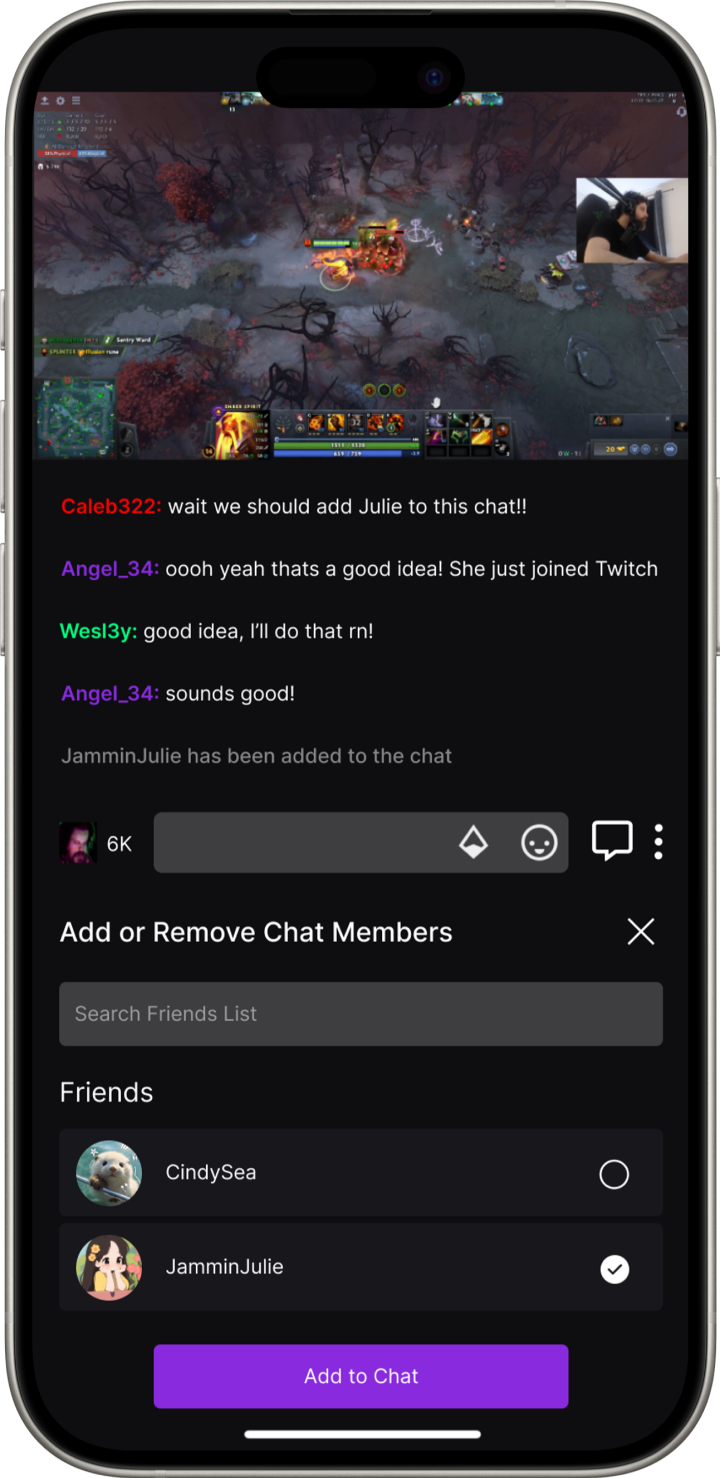
Project Overview
Background
Twitch is a popular livestreaming platform that brings together millions of people from around the globe to connect, chat, and collaborate in creating real-time entertainment. Whether you're a viewer enjoying content from your favorite streamers or a streamer engaging with your audience, Twitch stands as a rapidly growing platform at the forefront of the live-streaming industry.
Problem
Twitch offers numerous features to support its thousands of streamers and millions of daily viewers. However, there is a noticeable gap in fostering shared experiences among friends while watching streams. Often, when someone enjoys a particular streamer, their friends might be interested too. Currently, the typical solution is to share a link, allowing friends to watch the stream simultaneously but separately. This approach lacks the seamless connection that could enhance the experience of enjoying live streams together. By creating features that make it easier for friends to watch and interact during live streams, Twitch could elevate the shared viewing experience and make it more engaging and social.
Goal
To create a brand new feature that would make the experience of watching a streamer live more enjoyable with friends through a brand new space.
Project Type
Timeline
Role
Tools
70-80 hours
UX/UI; “Add A Feature”
Figma, Canva, Miro
UX/UI Designer; Researcher
Discover
Market Research
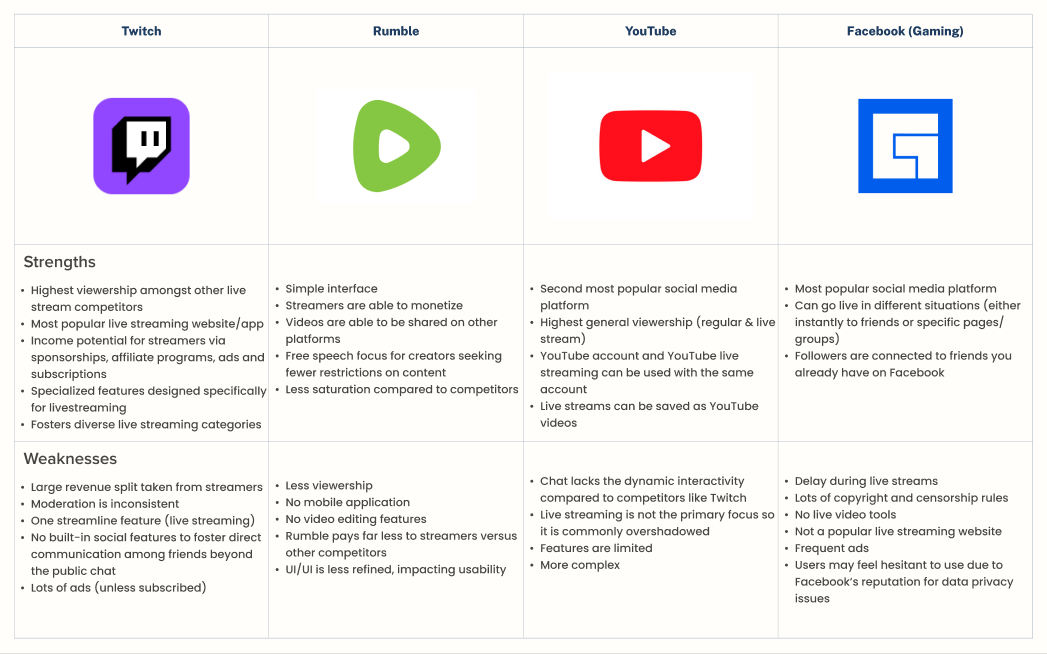
For this competitive analysis, I approached it with the understanding that livestreaming has numerous direct competitors. Over the years, livestreaming has gained immense global popularity and continues to experience rapid growth. Analyzing the market's current landscape and identifying the key factors that contribute to successful livestreaming is essential.
Competitive Feature Analysis
Insights
Twitch’s primary competitor weakness lies in limited social interaction features. Platforms like Facebook Gaming integrate social tools naturally through their networks, while Twitch primarily focuses on public chats.
Focusing on community features can to retain and engage audiences more effectively.
Twitch’s established strengths make it a leader, but there are clear opportunities to address.
User Research
User Interviews
The goal of the interviews is to gain insights into how users perceive Twitch's current features, including their likes, dislikes, and overall experiences.
Assess user satisfaction with Twitch’s current features and determine if there is a demand for additional functionalities.
Explore user experiences with specific Twitch features, including how they interact with and navigate these tools.
Analyze the frequency of feature usage on Twitch, identifying both popular and underutilized elements.
Gather feedback on users' overall likes and dislikes regarding Twitch to pinpoint areas for improvement and aspects that are working well.
Research Objectives
Research revealed how Twitch users engage with chat and where current features fall short.
Usage & Feature Insights
Live chat is the main form of engagement, but experiences differ by stream size: small streams feel intimate, while large streams are overwhelming.
Many users (60%) rely on external platforms like Discord to communicate with friends while streaming.
Concerns & Pain Points
Public chat is often too fast-paced, making meaningful engagement difficult (75% of participants).
Twitch’s private messaging (Whispers) is underused due to poor visibility and limited functionality (55% of participants).
While users value Twitch’s sense of community, they feel private conversations are limited and fragmented, forcing reliance on third-party apps (80%).
Key Takeaways
There is a clear opportunity to create a private chat feature that supports friend-based interactions, enhances social engagement, and integrates seamlessly with the main streaming experience.
What did I discover?
Define
Affinity Map
The affinity map organizes and categorizes the insights gathered from user interviews, providing a clear view of key themes and patterns in user experiences with Twitch. The data is grouped into distinct categories based on commonalities such as the positives/negatives of Twitch, features, experiences and suggestions. It serves as a visual representation of the user feedback, helping to inform the development of new features and improvements based on real user needs and behaviors.

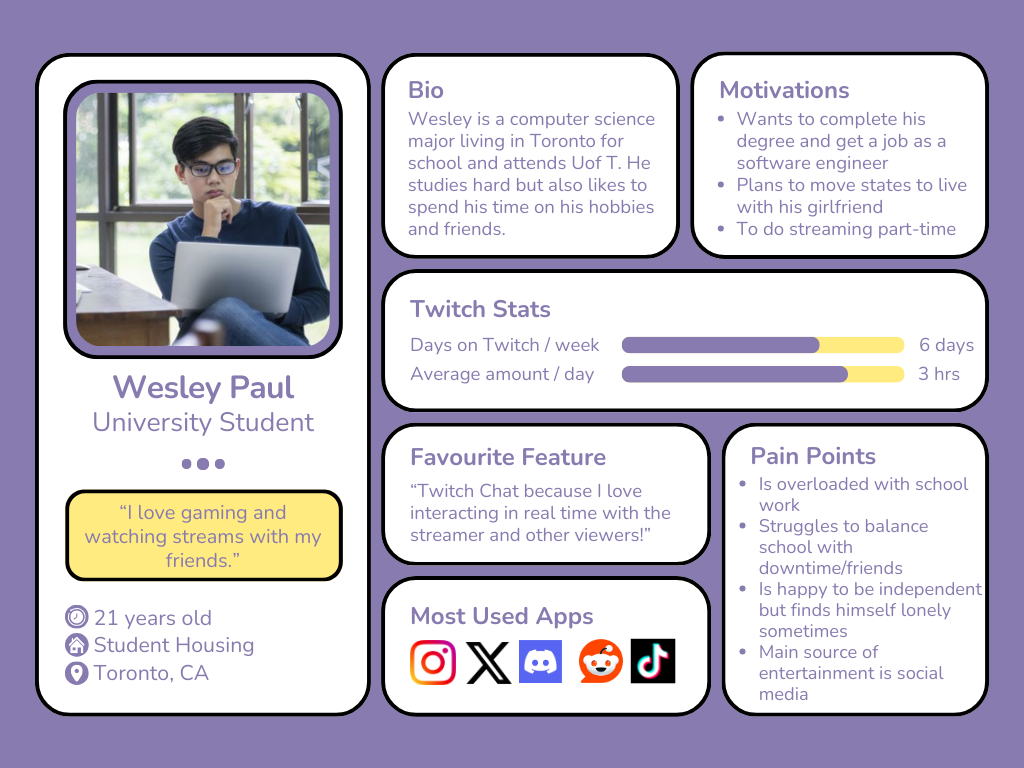
User Persona
Based on the data collected from the competitor analysis and user interviews, I developed a user persona that embodies a typical target user. This persona represents an individual who is deeply engaged in the Twitch ecosystem, facing challenges in their daily life. For them, Twitch serves as both an escape from reality and a genuine passion.
Defining our Problem
Problem Statement, POV, and HMWs
Based on the perspective of our user persona Wesley and data from our research, creating a problem statement will reflect my user’s challenges and unmet needs. By looking through the perspective of my persona Wesley, I am able to generate questions that will help me formulate solutions to my user’s pain points.
Problem Statement
Insights
The high volume of users in a single Twitch chat often leads to a lack of visibility for individual contributions. When friends or others try to engage in conversation, the fast-paced flow of comments makes it challenging to have meaningful interactions.
Needs
Users should be able to see their individual comment, or see others without it being lost in the chat allowing better interaction between groups and/or pairs of individuals.
POV
Wesley wants to be able to talk to his friend in chat, but every time he writes a comment, his friend never sees it.
HMWs
HMW increase Wesley’s comment to be more visible to his friend?
HMW reduce the amount comments so that Wesley and his friend can see each others comments easier?
HMW help Wesley and his friend have a more seamless chatting experience?
Key Findings
Improve User Engagement with Personalized Chat Features
Introduce a feature that allows users to create private or semi-private chat spaces within the stream, where they can engage in focused conversations without interference from the larger public chat.Increase Retention by Fostering Community Connections
Build a feature that allows friends to easily connect on Twitch and interact while watching, enhancing their social experience and making Twitch more engaging as a shared platform.Monitor User Feedback for Iterative Improvement
Continuously collect user feedback to refine and iterate on these social features, ensuring that the platform evolves in response to real user needs and preferences.
Actionable Insights
Ideate
Project Goals
Although collaborating directly with the Twitch team would have been an ideal opportunity, I focused on the next best step: formulating user goals that align with the core values and objectives of Twitch. These goals reflect my understanding of the platform’s essence while ensuring they meet the needs and expectations of the users.

Feature Set
With the project goals clearly defined, the next step is to translate these objectives into actionable user experiences. To achieve this, I listed out a set of features below:
Friends-Only Chat: A space on Twitch for friends to chat during a live stream
Switch Chat Option: An option for users to switch and/or view different chats
Create/Delete Chat: Ability to create a brand new chat or delete an existing one
Chat List: Display of different chats that a user has created
User Flow
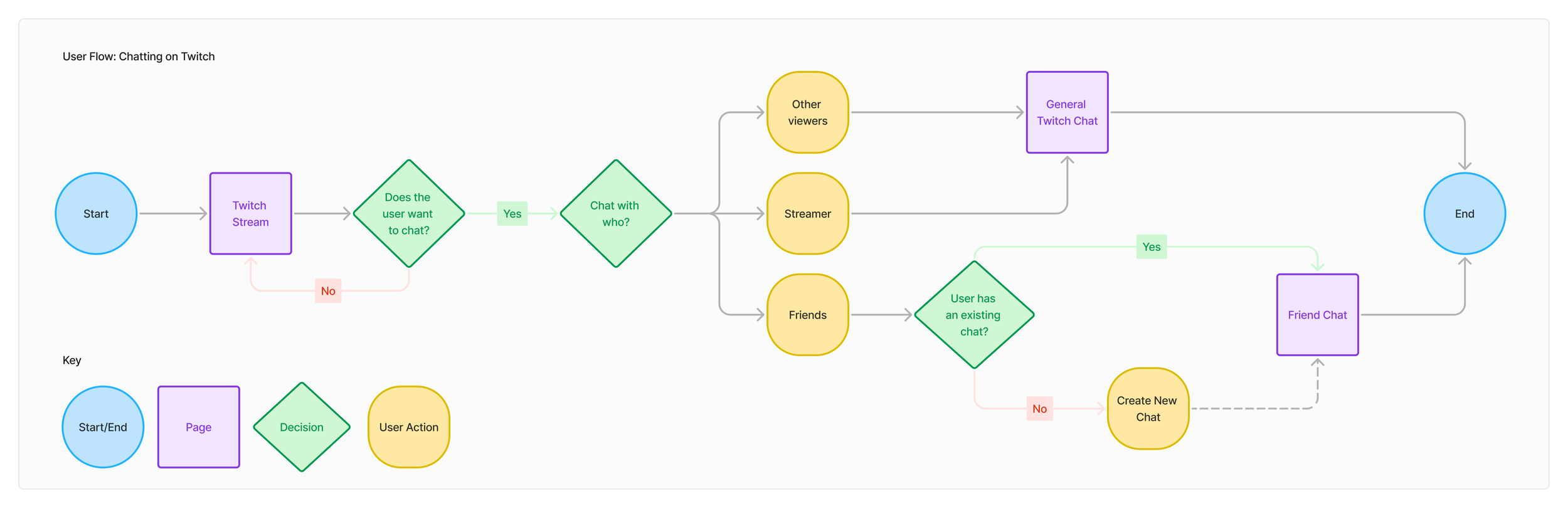
Below I have mapped out a user flow that outlines the steps a user would take to interact with the proposed features of creating a new chat, ensuring that their journey is intuitive, seamless, and aligned with the goals I’ve set.
Wireframing
Low-Fidelity Wireframes
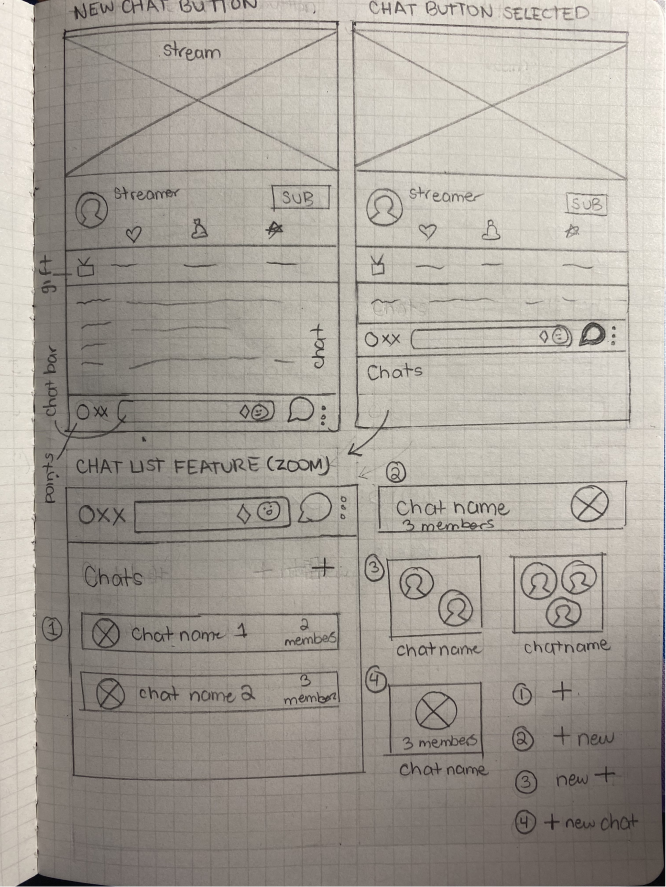
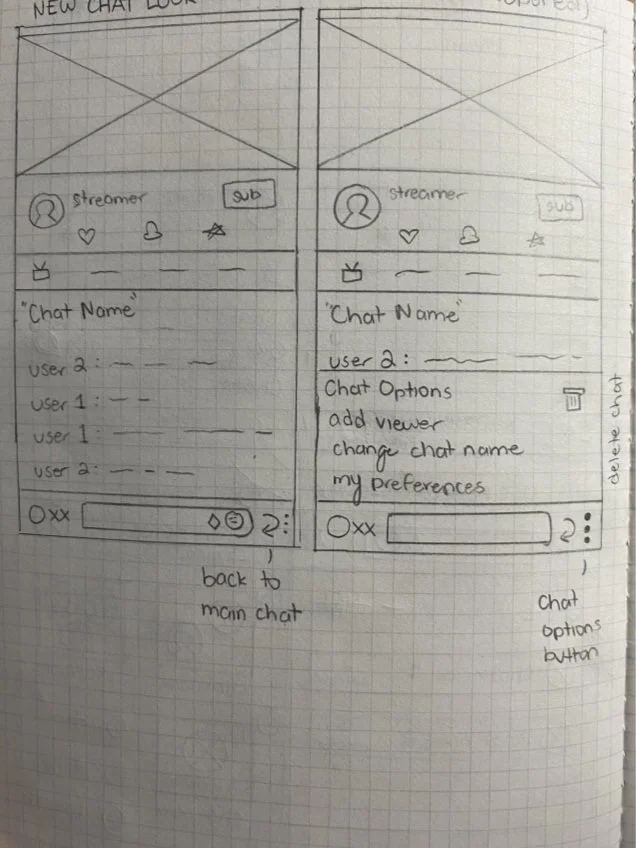
Drawing the low-fidelity wireframes was a crucial step in visualizing the structure and layout of the proposed feature. These wireframes allowed me to experiment with different layouts, positioning of elements such as the chat list and interactive chat bar.
Mid-Fidelity Wireframes
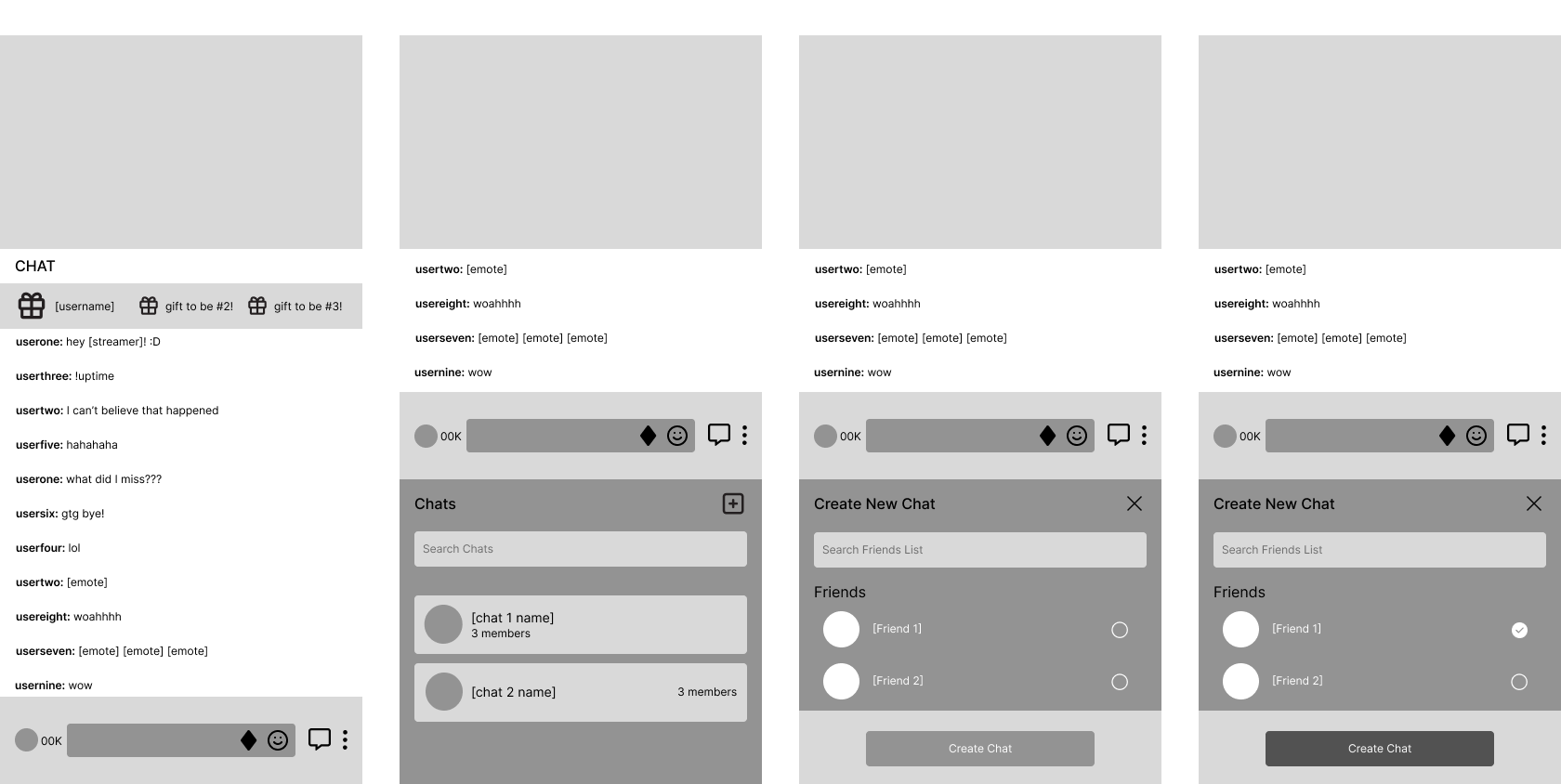
After receiving valuable feedback on my initial wireframes during a group critique session and consulting with my mentor, I began developing the mid-fidelity wireframes. This process allowed me to incorporate insights and suggestions into a more detailed representation of the design.
Prototype
High-Fidelity Wireframes
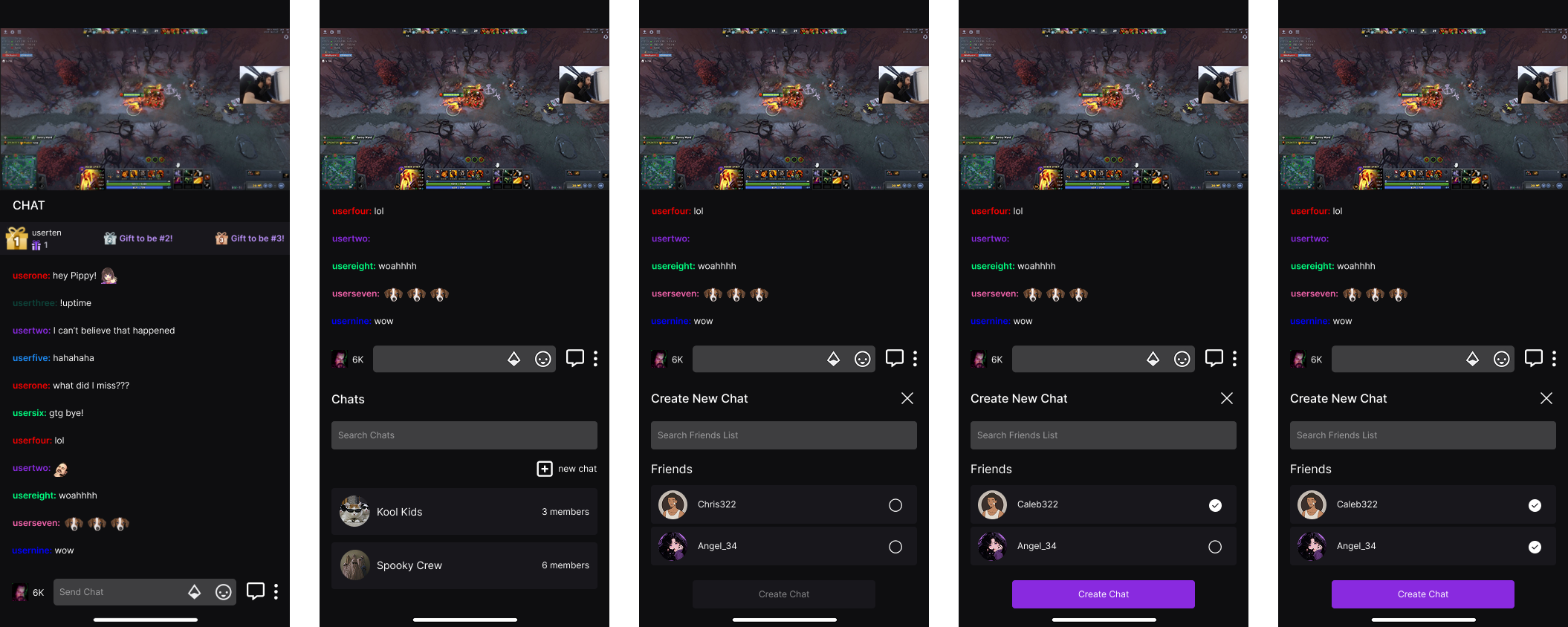
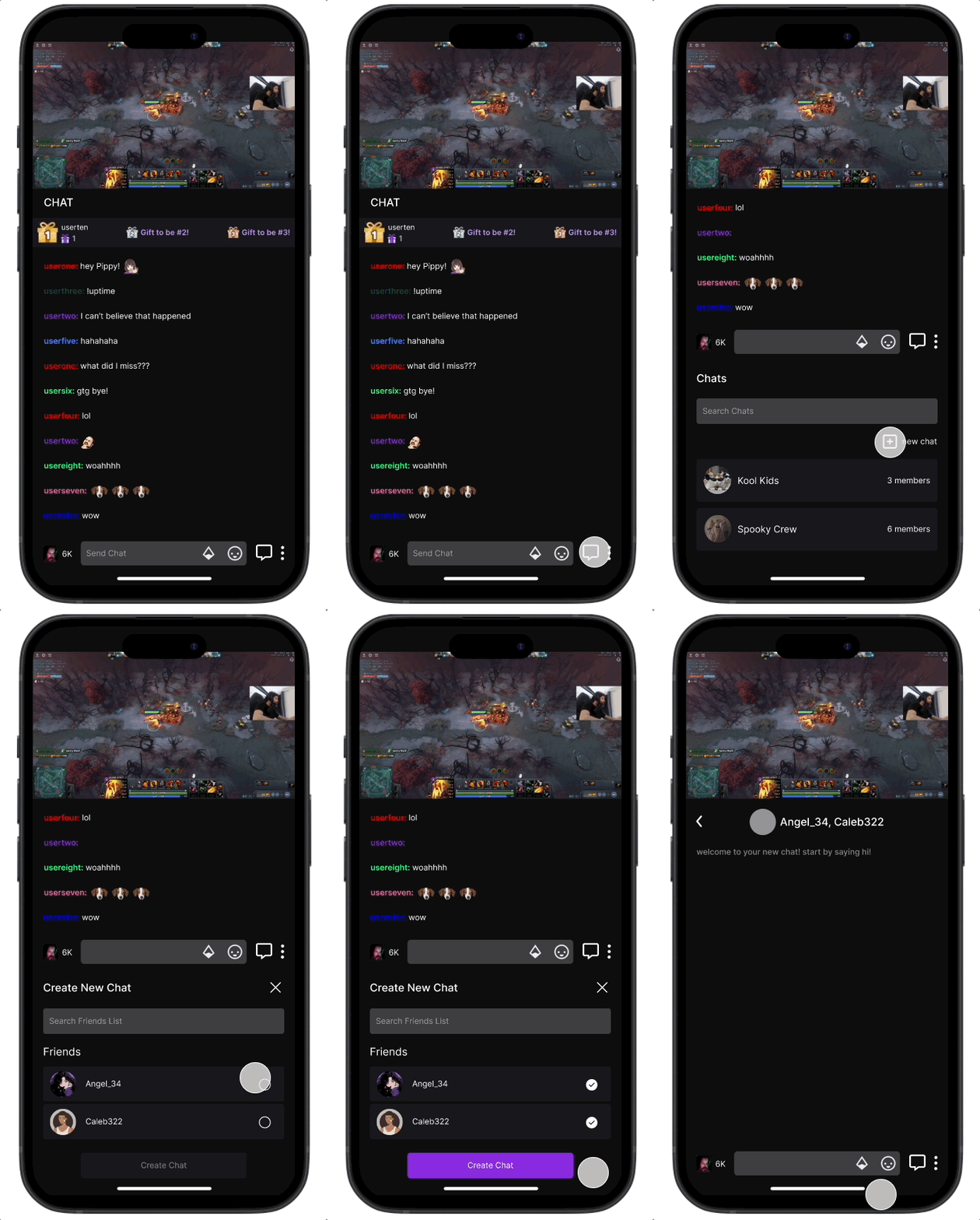
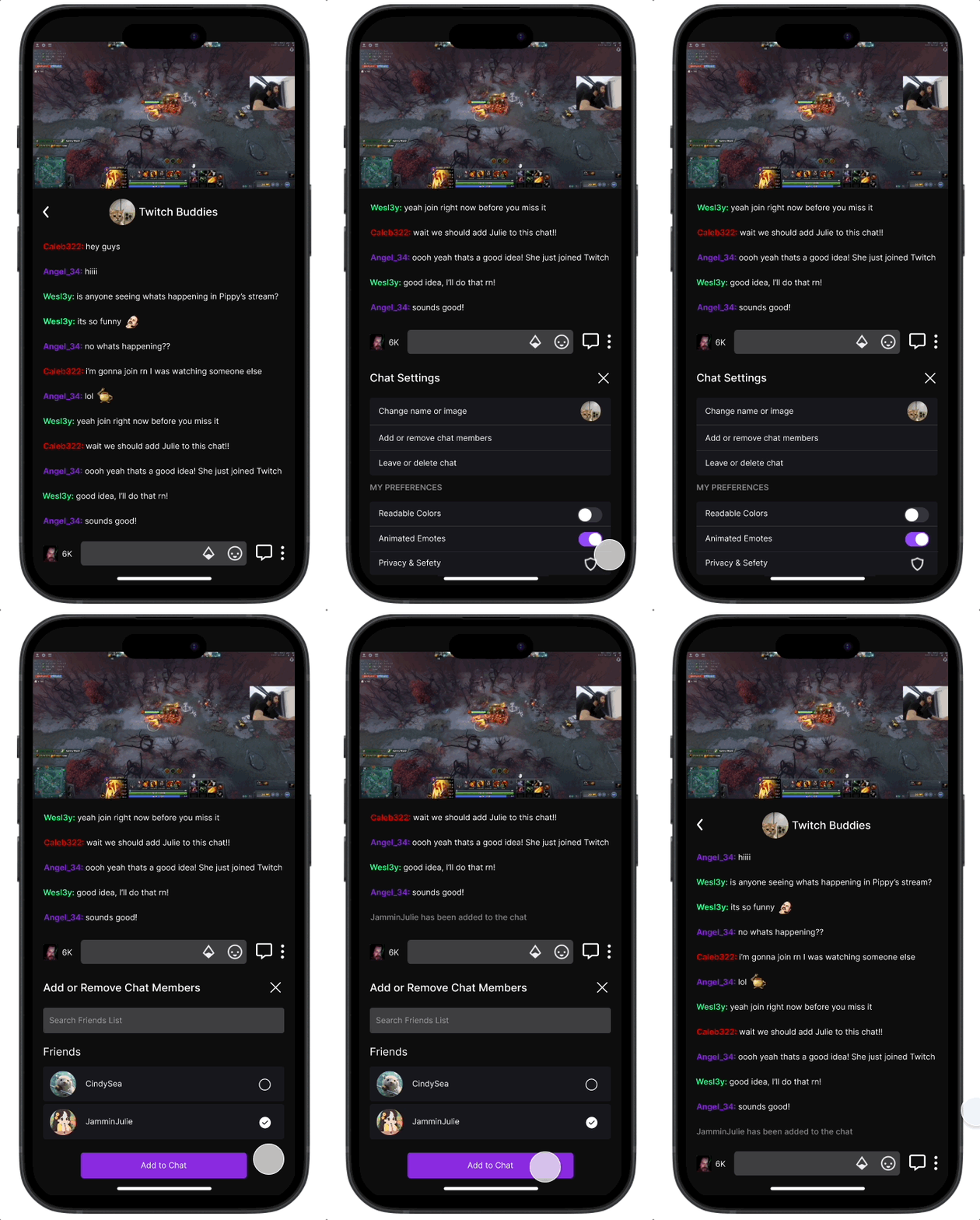
Building on the feedback and insights gathered from my mid-fidelity wireframes, I now incorporated brand-specific elements from Twitch such as its color schemes, typography, and icons, creating a more realistic representation of the actual app. The high-fidelity screens showcase the new chat feature, enabling users to create personalized chat spaces by inviting their friends.
Test
Usability Testing
Objective
To evaluate the usability of the high-fidelity wireframes of the new Twitch feature and identify any potential improvements that can be made.
Interview Style & Methodology
Interviews were conducted 1:1 via FaceTime, in-person, or Discord.
Number of Participants: 5
Task Flows:
Task Flow 1: Creating a new group chat with friends on Twitch.
Task Flow 2: Adding a friend to an already existing group chat.
Task 1 - Results
2/5 users experienced at least one error during the task.
(1) clicked on the box for selecting a user to add to a group rather than just the circle.
(2) did not know what to initially click when wanting to open the new feature.
100% of users were satisfied and were able to successfully complete each task.
2/5 users mentioned that there could be some improvement on the title of new chats created.
4/5 users stated that they found the task easy to complete.
Interview Insights & Feedback
Consider expanding the "Chat Settings" to include more customization options for users.
The bars and buttons may blend too much with the background color—adjust the contrast to improve visibility.
Buttons appear closely spaced; increasing the spacing slightly could improve usability and align with Twitch’s design standards.
Adding filter options for the friends list, such as sorting alphabetically, could enhance navigation.
Explore the possibility of allowing users to invite non-friends or non-Twitch users to a group chat through an invite link.
Clarify whether the group chat will be global across the platform or specific to each streamer’s community.
Define what happens to the chat title when a group chat includes a large number of participants—will it adapt dynamically?
Determine whether there should be a maximum participant limit in group chats
Priority Revisions
Alphabetical Order
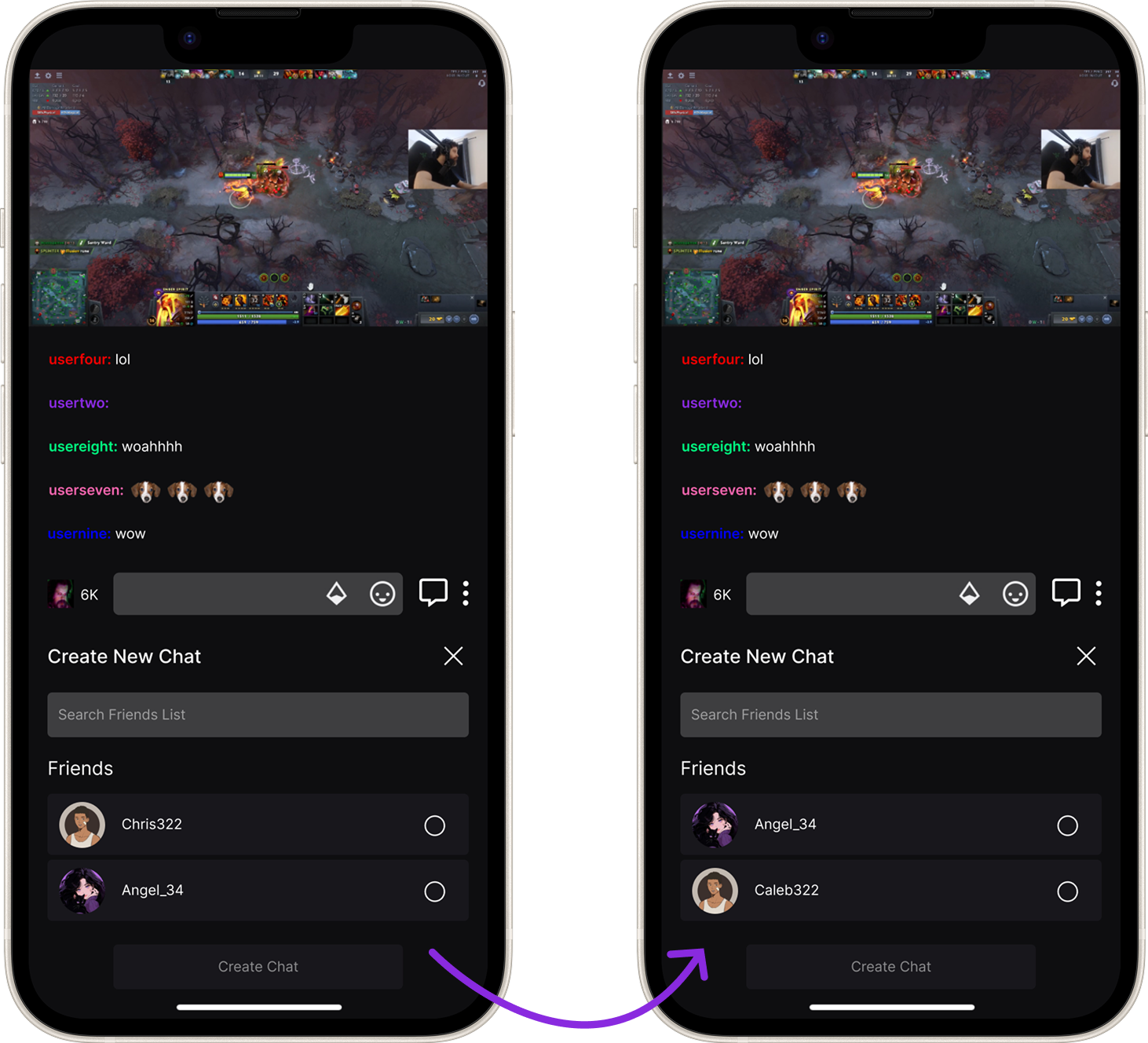
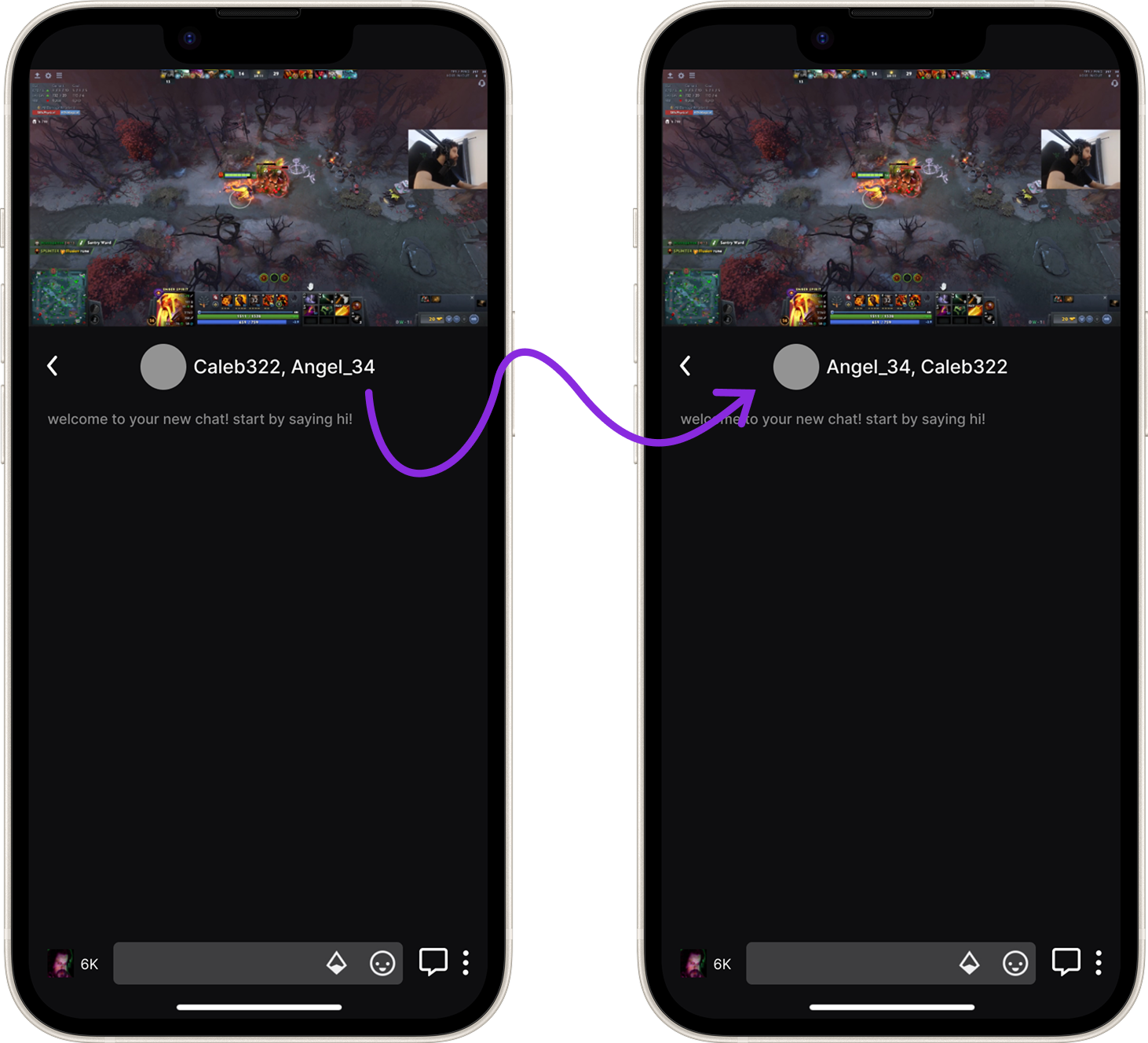
After reviewing the feedback, I decided to implement a revision that sorted filter options, such as the friends list and group chat names into alphabetical order. This change aims to enhance usability by making it easier for users to navigate through their contacts and group chats.
Enhancing Button Interface
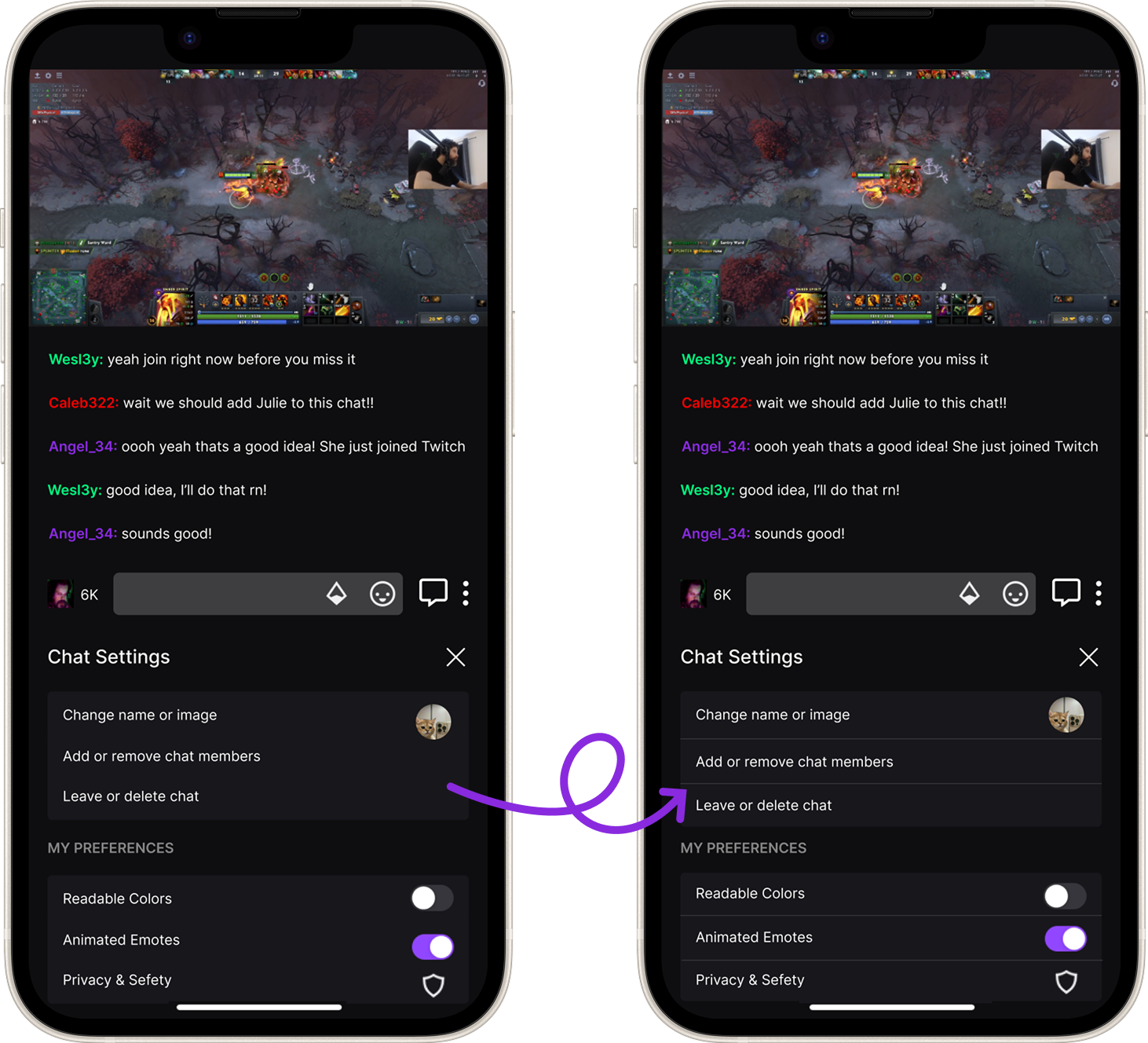
I revised the button design by adding visible lines between each button. This adjustment not only enhances the visual clarity, making the buttons more closely resemble those found on Twitch, but also improves functionality by increasing the spacing between them. The added separation reduces the likelihood of accidental clicks, creating a more user-friendly experience.
Task 2 - Results
1/5 users experienced at least one error during the task.
(1) did not know what to initially click when wanting to create a new group chat.
100% of users were able to successfully complete the task with satisfaction.
2/5 users mentioned that they would like to see more details/features for adding friends (see interview insights below).
5/5 users found the task easy to understand.
Improving Button Functionality
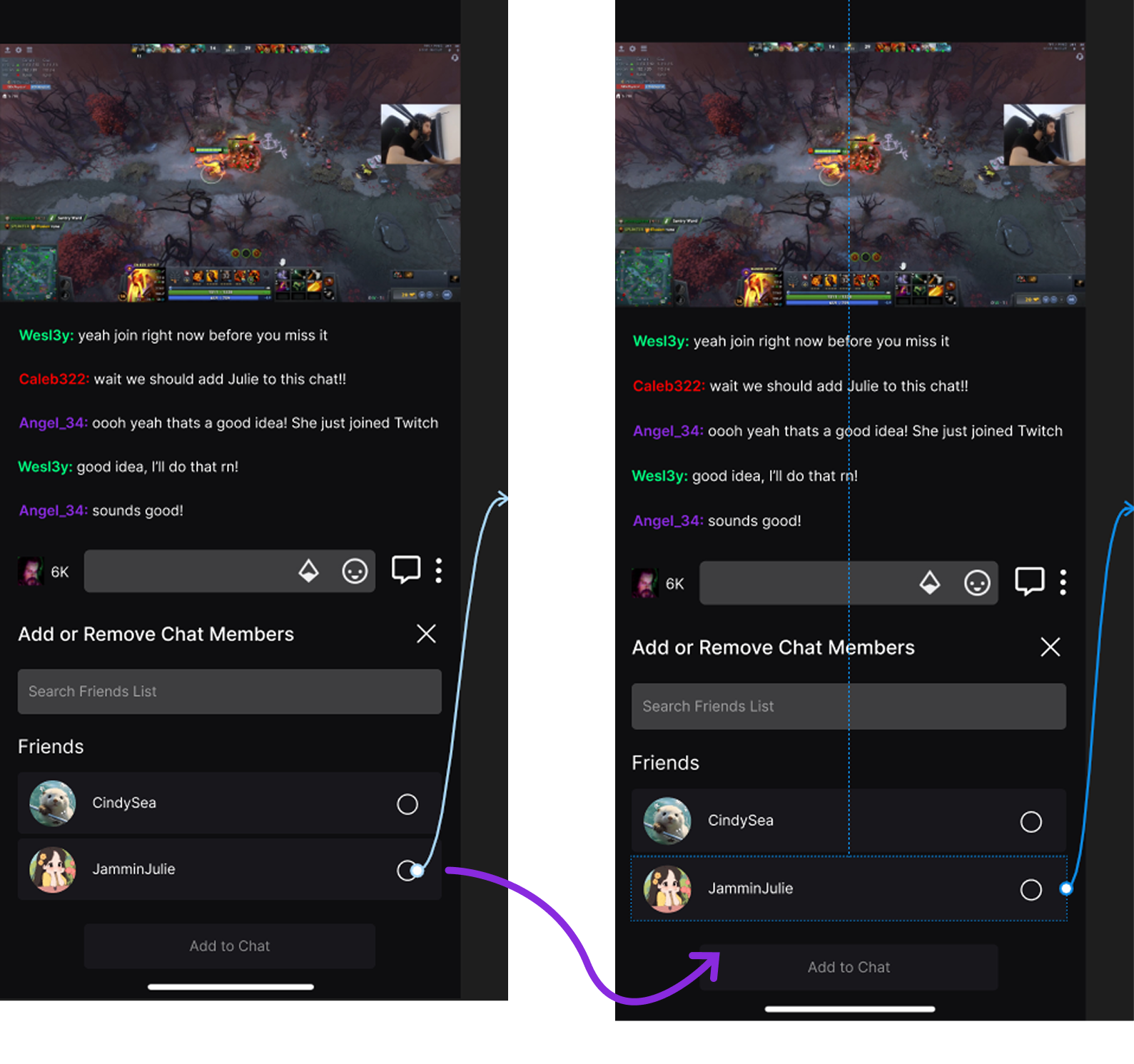
During user testing, I discovered an issue where a user attempted to add someone to a chat group by clicking on the box surrounding the selection circle, but the action didn’t register because only the small circle was clickable. To address this, I revised the functionality to make the entire box clickable, ensuring a smoother and more intuitive interaction. This adjustment eliminates confusion and reduces the potential for missed selections, enhancing the overall usability of the feature while aligning with user expectations.
Final Prototype
Takeaways & Next Steps
Reflection
Working on this project has allowed me to not only dive into something I’m passionate about—live streaming—but also to discover and learn more about how regular viewers like me interact within these community spaces. It was an insightful journey to see how others engage with Twitch and how they navigate the social aspects of the platform.
One of the most impactful discoveries for me was the importance of creating a bridge between viewers and streamers, as well as between friends within the streaming environment. Without this connection, there’s a noticeable gap that can lead to increased usage of third-party platforms or a general sense of disconnect that disrupts the overall streaming experience. This insight made me realize how vital it is for Twitch to foster both community and personal connections within the platform itself.
If I were to do this project again, I would place a greater emphasis on exploring how different user groups—such as casual viewers versus dedicated fans—engage with community features. I would also conduct more targeted usability testing to ensure that the new chat feature meets the needs of diverse audiences. Gathering insights from a broader range of users would help refine the design and make it more universally appealing.
Next Steps…
Moving forward, I believe this feature has a lot of potential so I would go back and do further usability testing and get feedback from a wider range of users. Additionally, I would then start to develop the bigger picture for this feature and collaborate with developers to assess the technical feasibility of integrating the friend chat feature into Twitch’s existing infrastructure. Lastly, if this feature were really to come to light on Twitch’s platform, I would continue researching how community dynamics evolve on the platform, ensuring that future updates align with users' expectations and enhance their sense of connection.