
Meeka
Project Overview
Client Background
InPower is an emerging social media platform dedicated to creating a safe space for all of their users. Currently in its beta phase, InPower envisions a community where users can engage in respectful interactions and access a variety of resources throughout the platform. As part of that mission, they seek the creation of a new chatbot feature that uses the power of AI and their library of resources to help their users.
Problem
Traditional social media often exposes users to cyberbullying, harassment, and mental health challenges without providing direct solutions to these problems. This can lead to long-term damaging effects such as anxiety or depression.
Goal
As part of a team, I aim to collaborate and design a new AI-based chatbot for the new InPower app to help provide users with help and resources whenever they need it.
Project Type
Timeline
UX/UI; “Create a New Feature”
4 weeks; 80+ hours
Role
Tools
Figma, Canva, Miro, Lyssna
UX/UI Designer; Researcher
Discover
Market Research
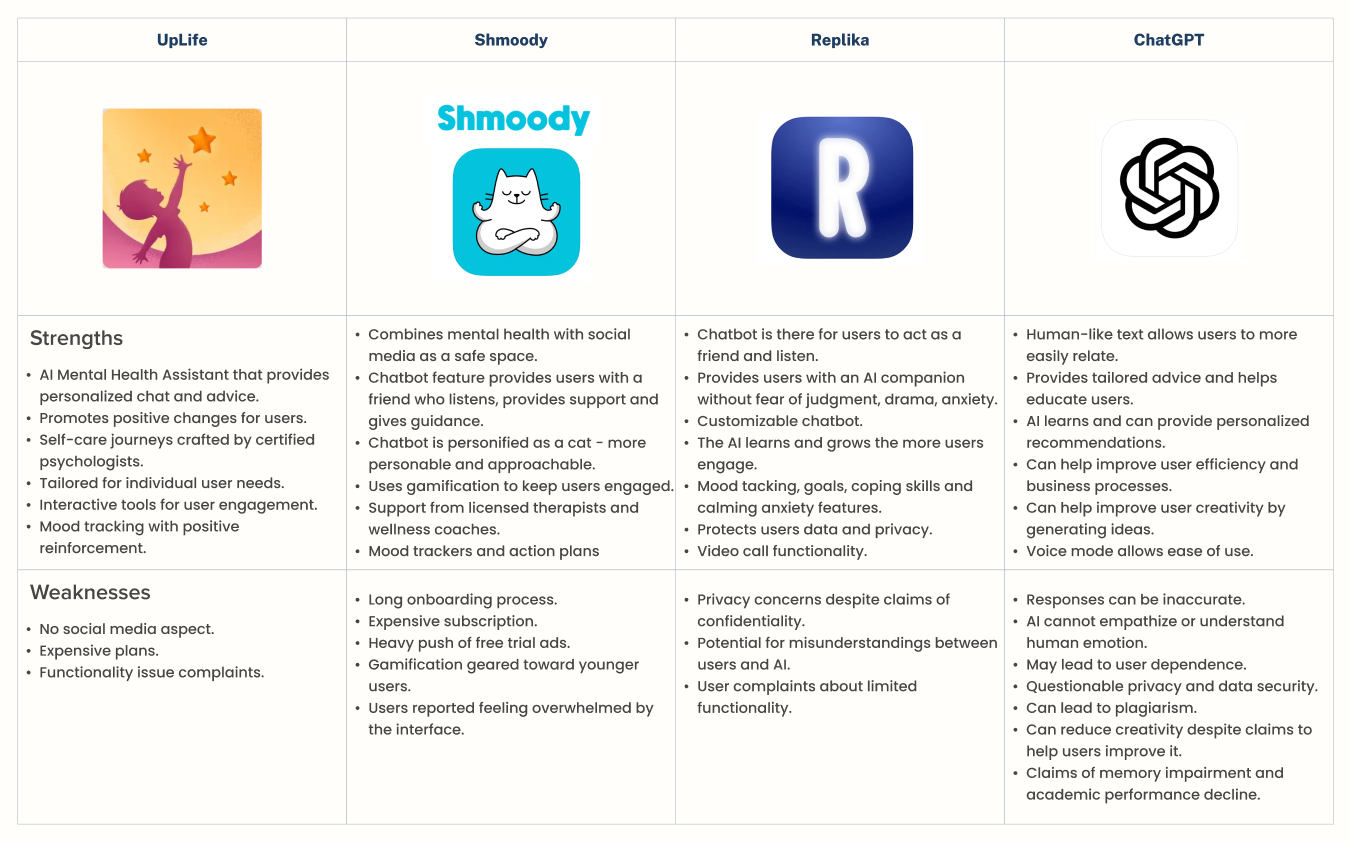
The approach to start with a competitor analysis helps me to fully understand the current market of competitors and their solutions when it comes to AI and chatbots. This analysis provided valuable insights into industry trends, user expectations, and feature gaps. I explored more direct competitors that aim to assist with mental/physical health, but also indirect competitors that are still AI-based chatbots but do more generalized tasks.
Competitive Feature Analysis
Insights
Research revealed that chatbots take different approaches to communication, ranging from human-like to bot-like, depending on the user’s needs. All 4 competitors analyzed (100%) include robust features that help users solve problems, such as mood tracking, calming exercises, and other supportive tools. At the same time, every competitor has weaknesses, underscoring the importance of learning from these gaps to improve Meeka while avoiding similar pitfalls.
User Research
The goal of the interviews is to fully understand the background and experience of users when it comes to chatbots and AI.
User Interviews
Research Objectives
Understand how much knowledge users have on chatbots and AI.
Determine the reasons why users use chatbots and AI.
Understand how chatbots and AI are implemented in the user’s day-to-day life.
Discover what features users look for or expect when using chatbots/AI.
Learn about their key points and pain points when it comes to chatbot/AI experience.
What did I Discover?
User research revealed patterns in how people interact with AI chatbots, their preferences, and key concerns, highlighting opportunities to make Meeka both engaging and trustworthy.
Usage & Preferences
Most users interact with chatbots for daily tasks like checking the weather or setting alarms, while some use them for work or study.
Preferences for chatbot personality vary: 40% favour personified, human-like bots for easier, more engaging, and emotionally supportive interactions; 20% prefer bot-like AI to avoid unnatural or misleading interactions; 40% have no strong preference, often using AI sporadically or valuing both approaches.
Concerns & Pain Points
Privacy is a major concern: 80% of users worry about data security and are hesitant to share personal information.
Users are cautious about dependency and ethics, with some fearing over-reliance on AI and its broader social impacts.
Trust and credibility are critical: 4 out of 5 users hesitate to rely on advice or information unless it comes from credible, professionally backed sources, particularly for sensitive topics.
Key Takeaways
Users want an AI that feels supportive and engaging while remaining trustworthy, secure, and adaptable. Prioritizing privacy, offering flexible responses, and grounding the chatbot in credible sources will increase adoption and user confidence.
Define
User Personas
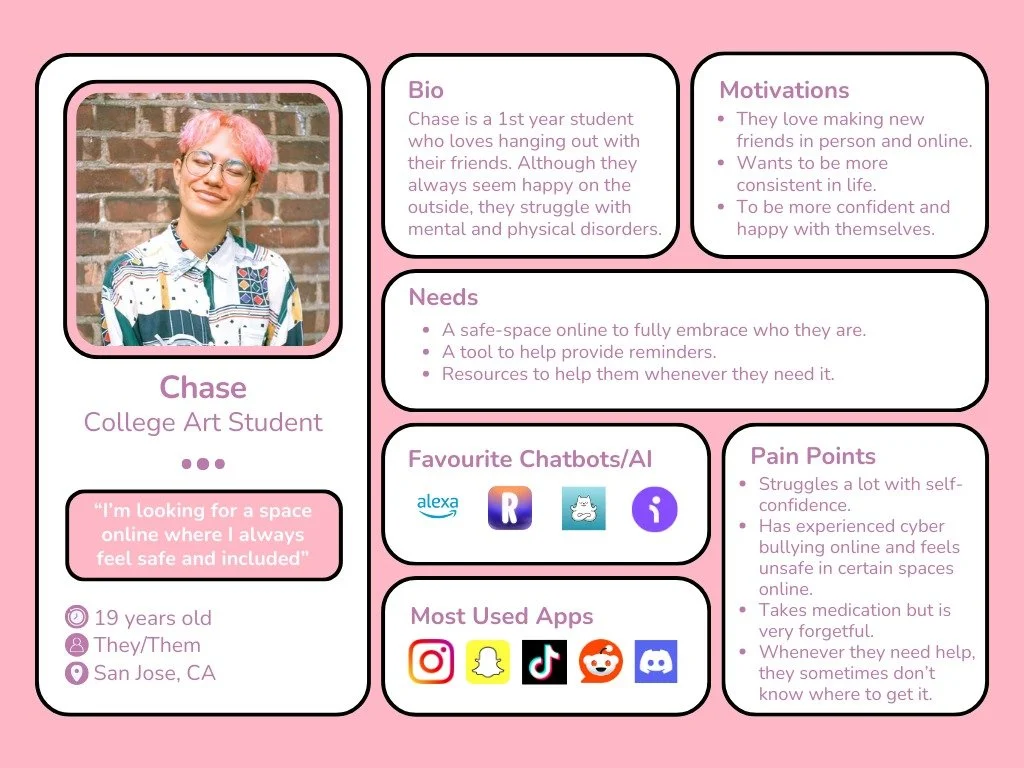
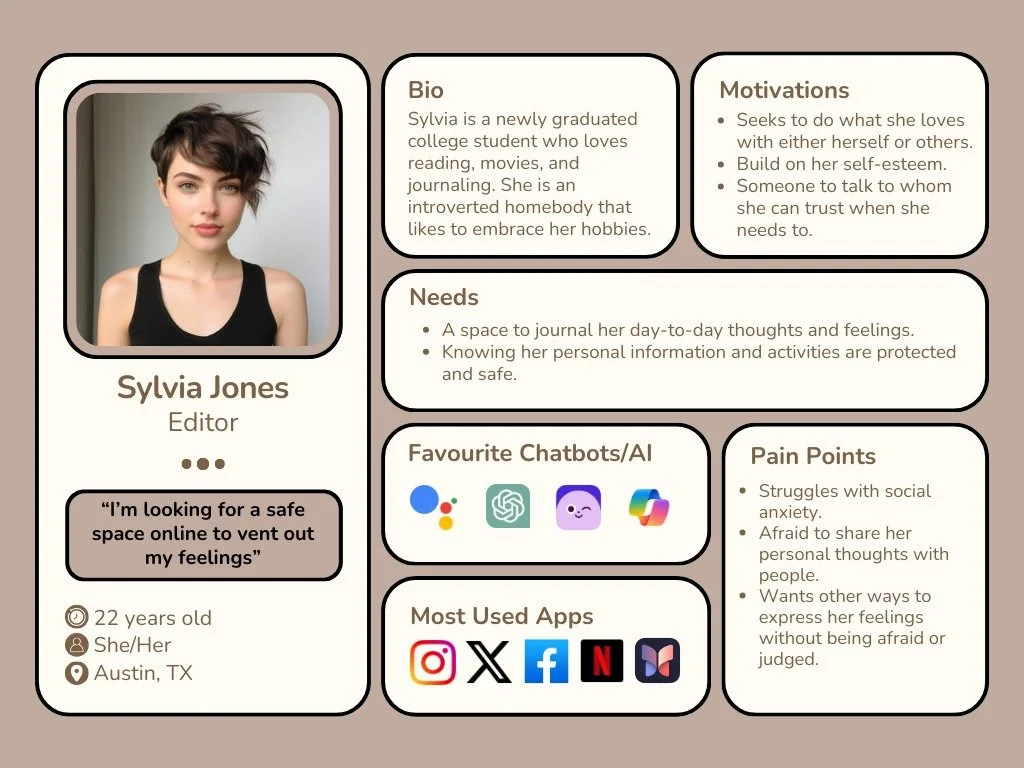
Using data that I collected from the competitor analysis and user interviews, I created detailed user personas that represent the target users. These personas encapsulated the users’ goals, pain points, and behavioral patterns, serving as a reference point throughout my design process.
Defining our Problem
Problem Statements, POVs, and HMWs
Based on the perspective of our user personas and data from our research, I developed problem statements that reflect the challenges and unmet needs of InPower’s users. These statements help me learn about certain struggles these users may face, which then helps me generate questions that will help me solve these certain struggles.
Statement 1
Insights
Social media users may encounter negative experiences online, such as cyberbullying or anxiety stemming from a lack of safety. Often, social platforms fail to provide someone to talk to or accessible resources when users need them most.
Needs
Users should be able to have access to help with these experiences whenever they need it.
POV
Chase woke up with a wave of anxiousness one day and does not know how to control these feelings.
HMWs
HMW assist the user at any time and help with any immediate concern?
HMW provide the right tools that would be beneficial to the user?
HMW prove to the user that any resources provided are trustworthy?
Statement 2
Insights
Social media users often find themselves overwhelmed by the chaos of the internet or the challenges of daily life, seeking a moment to pause and express their thoughts. However, they may struggle to find safe and constructive ways to share these feelings.
Needs
Users should be able to have a safe, protected space where they can express their thoughts and feelings.
POV
Sylvia is having a hard day at work but has no family or friends to talk to. She is desperately looking to vent out her feelings to either herself or someone she feels like she can trust.
HMWs
HMW provide the right tools to give our users the freedom to express their feelings?
HMW create a safe space that protects our users from others including third-parties?
HMW encourage users to convey their feelings?
Key Findings
Actionable Insights
Personalize the Experience to Individual Needs
Users value tools that cater to their unique challenges and goals. The feature I help to create should include personalization options to resonate deeply with each user’s lifestyle and preferences.Provide a Safe Space for Expression & Communication
Users need a secure and non-judgmental environment where they can openly share their thoughts and emotions without fear of criticism or harassment. Additionally, the feature should promote safety and confidentiality.Offer Timely Emotional Support
Many users lack immediate access to someone they can talk to during moments of stress or vulnerability. Incorporating features that provide users the support they need when needed.
Ideate
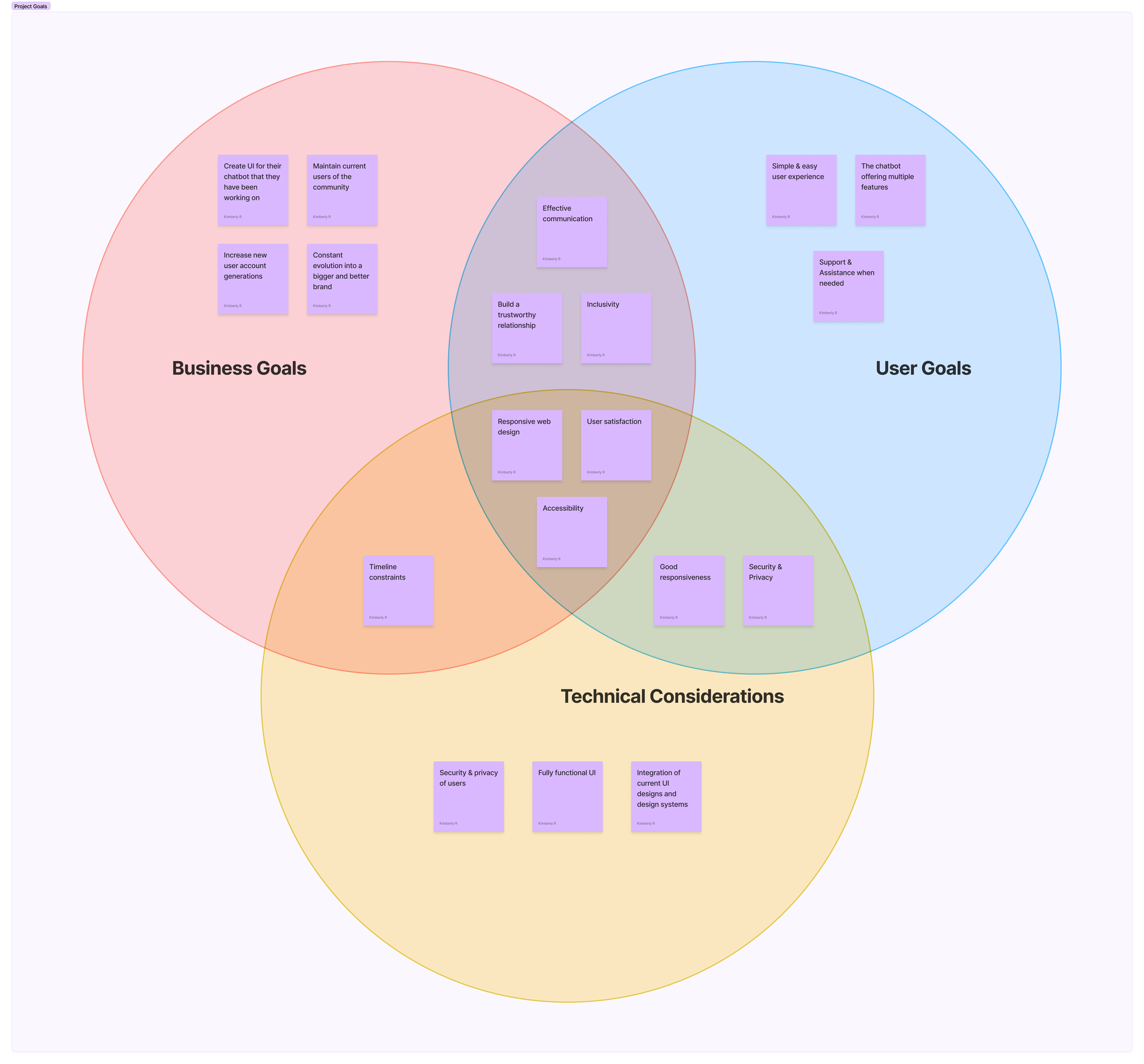
Project Goals
Before taking the next step, we circled back with our client, InPower, to present our findings and insights. This collaborative discussion allowed us to align on the project’s direction, validate our understanding of their vision, and address any new considerations. Together, we translated the research into clear, actionable project goals that prioritize user safety, emotional support, and lifestyle enhancement. This step ensured that both the client’s objectives and users’ needs were central to the design process moving forward.
Feature Set
It’s time to formulate solutions.
Building on the foundation of my previous work—including user interviews and competitive analysis—I developed a comprehensive list of features tailored to user needs. Each feature was thoughtfully designed to enhance the user experience, incorporating tools like breathing exercises, mood tracking, and journaling, while ensuring they aligned with user expectations and goals.
P1: Must-Have
Chatbot Icon
Welcome Screen
Chat UI
Activity Icon or Section
P3: Surprising & Delightful
Chatbot Personality
Breathing Exercises
Feedback
P2: Nice to Have
Scheduler
Journal
Daily Mood/Tracker
Notifications
P4: Can Come Later
Chatbot Personalization
Onboarding Questionnaire
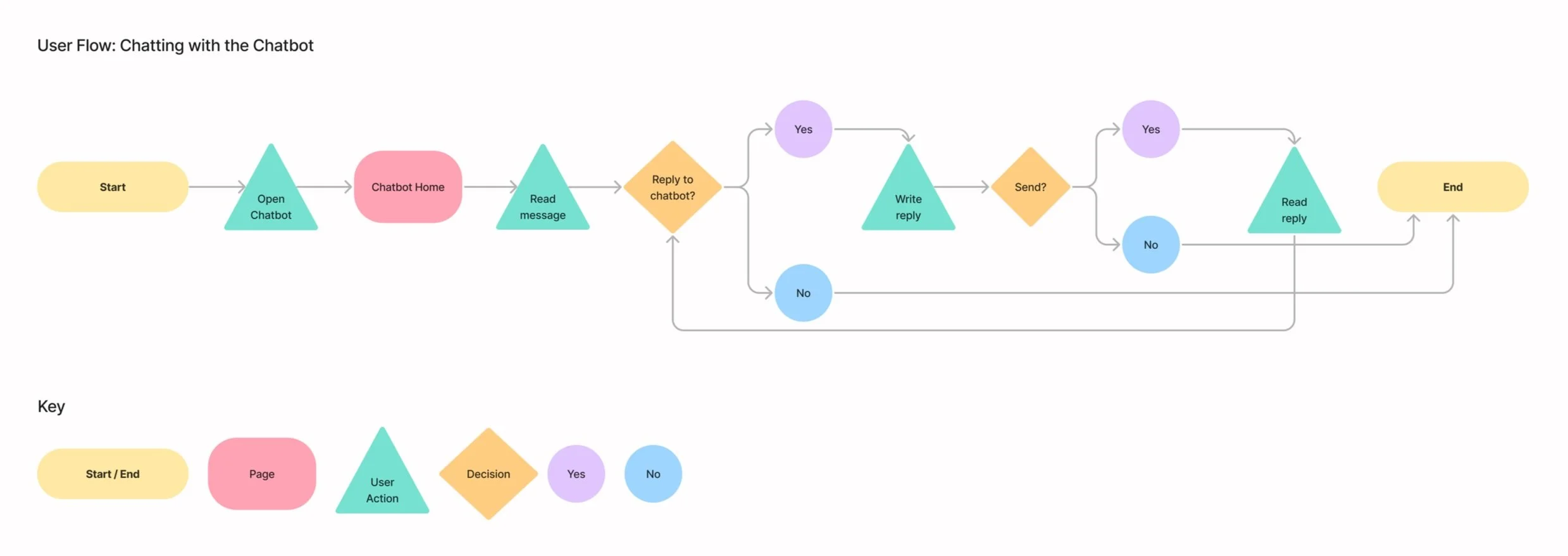
User Flow
The user flow below illustrates the journey users take when interacting with the chatbot. Starting from opening the bot to engaging in a conversation, it highlights the diverse interactions and pathways available to create a seamless experience.
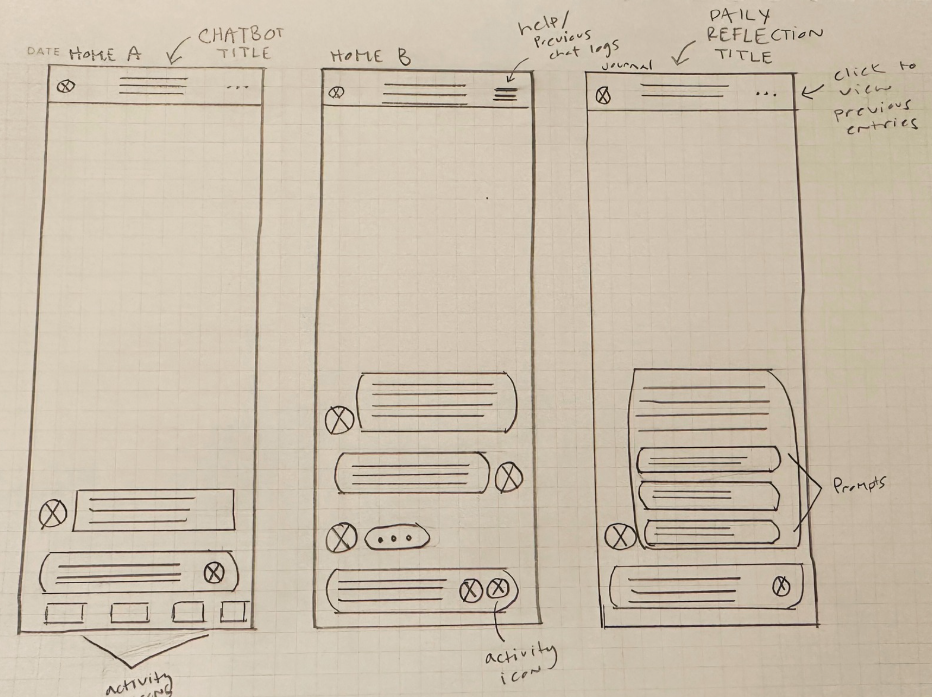
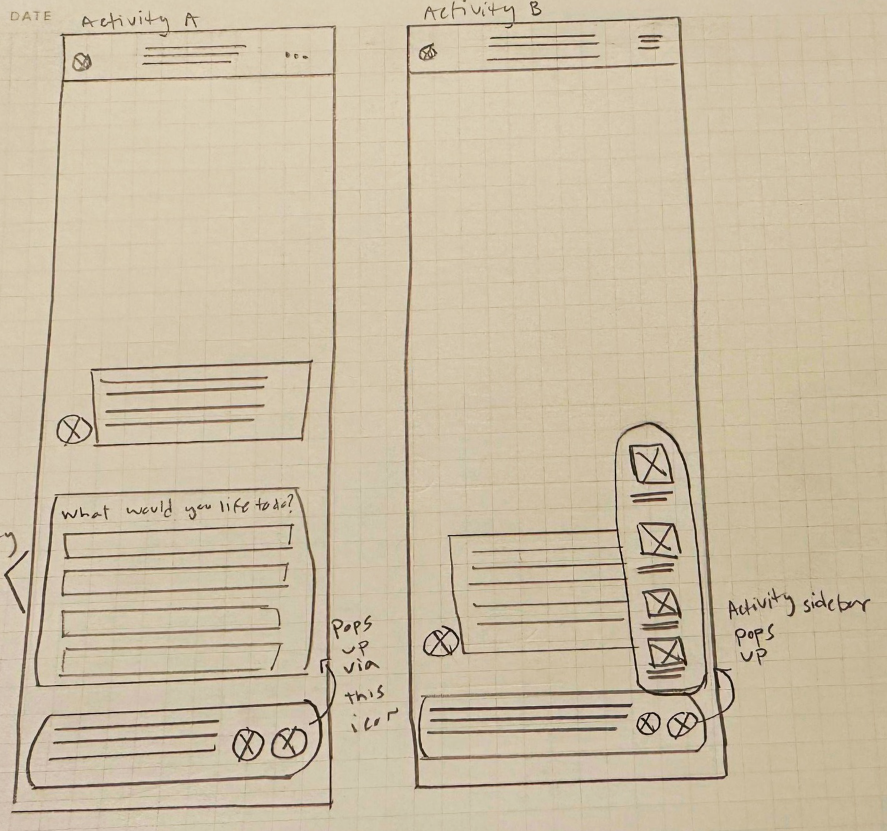
Wireframing
I created my low-fi wireframes using pencil and paper for quick and effective iterations. This helped me as a designer by putting out multiple ideas at once and not getting too attached or strung onto one single design. Working with my team, we gave each other feedback and created even more sketches which elevated our ideas and designs.
Low-Fidelity Wireframes
Why Meeka?
Before diving into higher-fidelity prototyping, my team and I met with our client and discussed naming the chatbot. Our research showed that giving the bot a name could make it feel more human-like and relatable for users. The clients stated that the name was all up to us, but would love it if the name was unique but also had some meaning.
After brainstorming some ideas, I recalled the client mentioning a friend named ‘Dominique.’ Inspired, I researched nicknames for Dominique and discovered one of them was ‘Meeka.’
When I shared the name with my team and client, they all loved the idea and that is how Meeka came to life.
Prototype
Mood Board
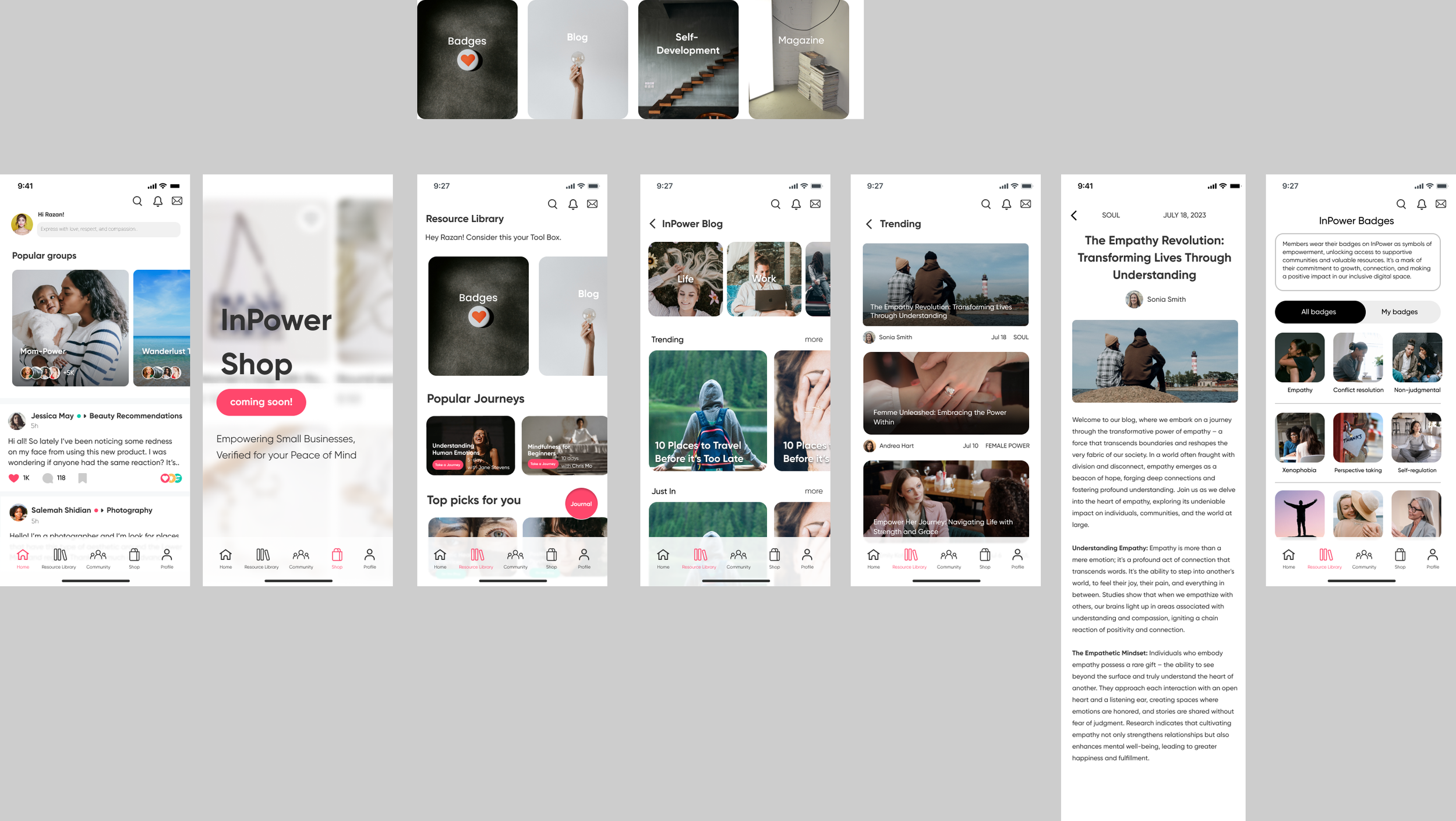
The mood board for our chatbot was carefully designed to align with the existing screen styles of InPower's prototypes. Although InPower is still in its beta stage, their prototypes and screens already establish a distinct visual style. To ensure consistency and a seamless transition between their app and our feature, we intentionally incorporated this style into the chatbot’s design.
UI Kit
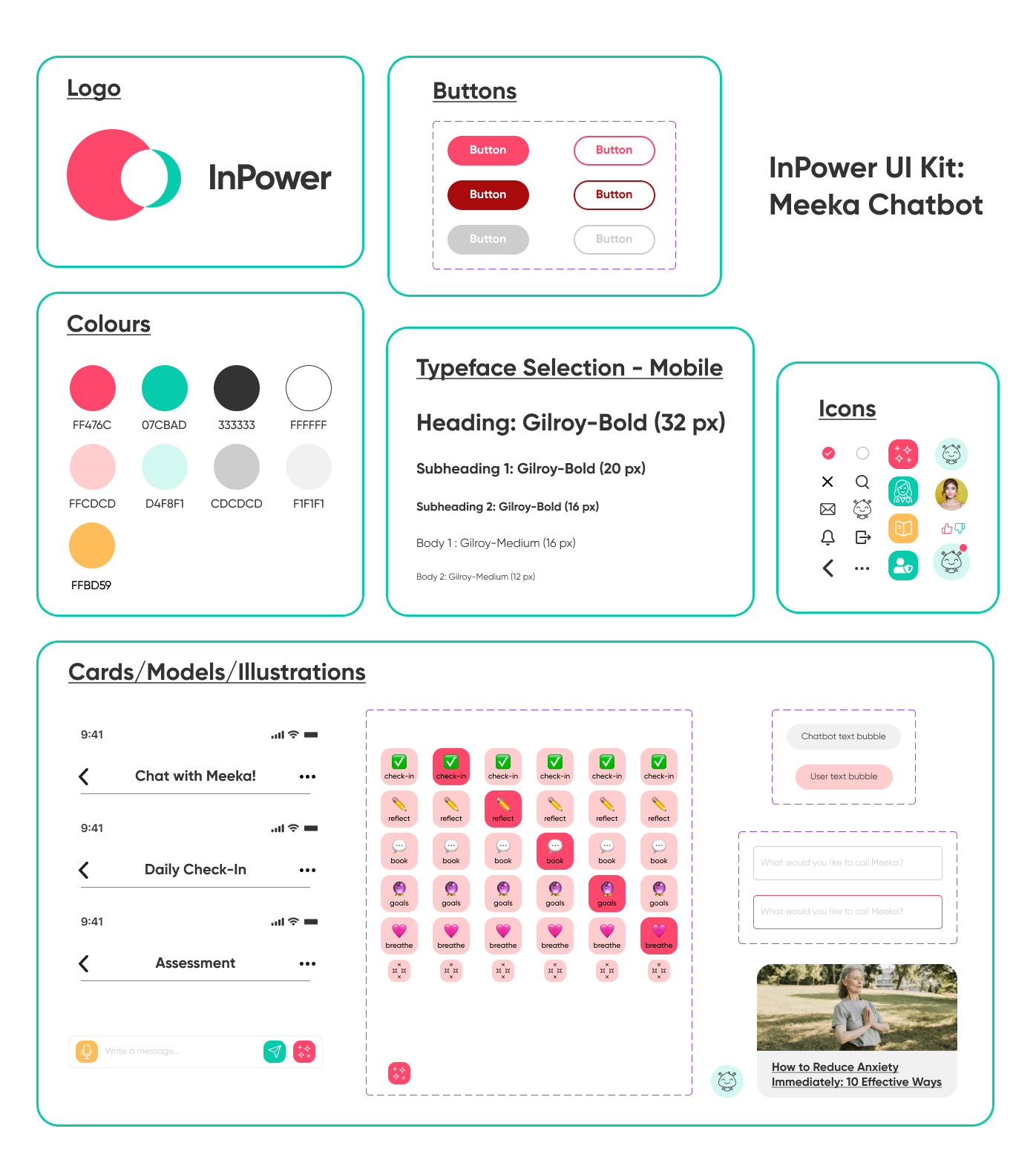
Based on the already existing UI of InPower, I developed a UI kit consisting of the same colors, fonts, and styles. This UI kit served as a shared resource for my team and I streamlining the design process by providing a consistent visual framework. With the UI kit in place, we were able to save time and design more efficiently while maintaining consistent with InPower’s existing look.
High-Fidelity Wireframes
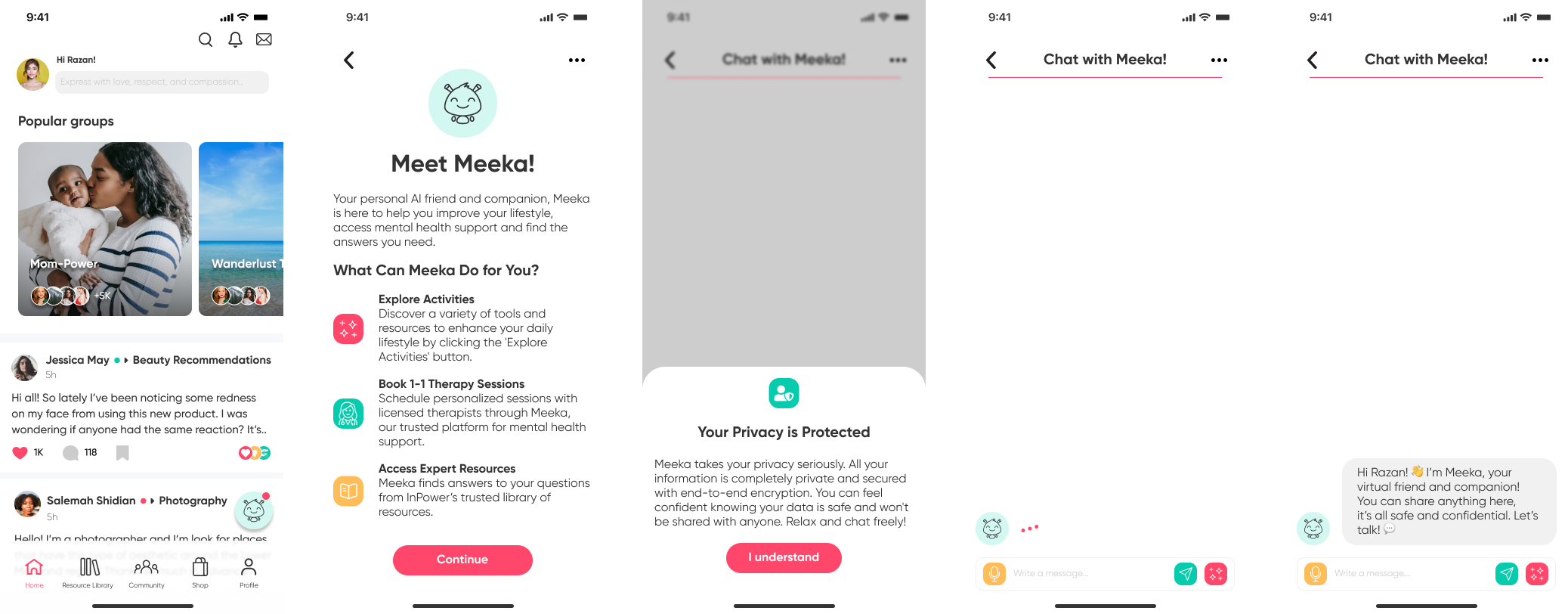
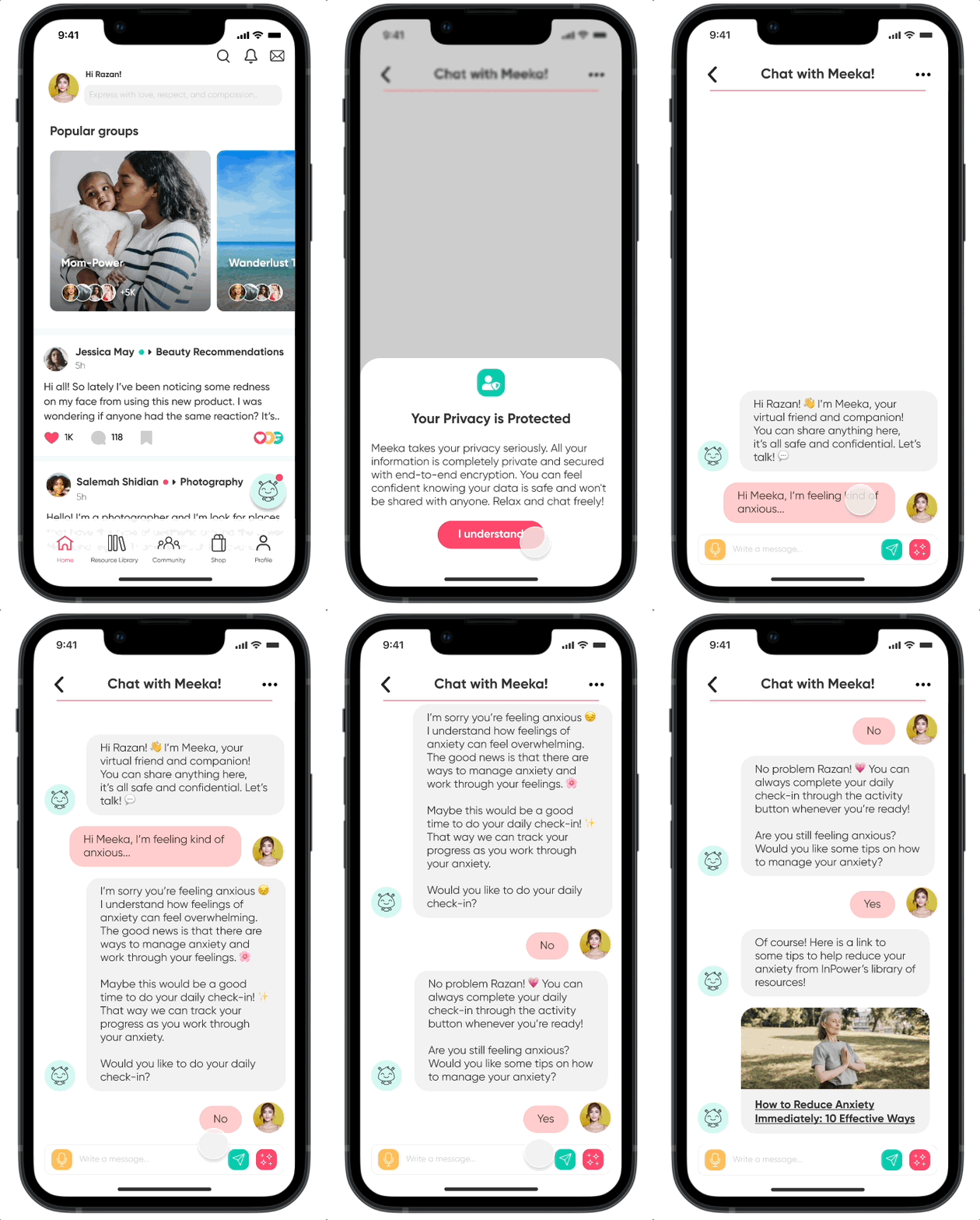
Below is a preview of the high-fidelity flow I designed to illustrate a conversation between a user and the Meeka chatbot. These screens showcase the UI and interactions that the users can experience while exploring Meeka through the app. While my team and I focused on different flows, my focus was on the users’ journey of navigating the feature, starting a conversation with Meeka, and receiving help through a resource provided by Meeka. Once these flows were completed, the next step was to test them.
Test
Usability Testing
Objective
Determine how effectively users can navigate the chatbot’s features and identify areas that require improvement.
Interview Style & Methodology
Interviews were conducted 1:1 via FaceTime, in-person, or Discord.
The website Lyssna was used to host the usability testing with each user.
Tasks:
Task 1: Find Meeka (the chatbot) and initiate a conversation.
Task 2: Engage in a conversation with Meeka, opting to decline the ‘Daily Check-In.’ Continue the interaction until Meeka provides you with a resource link.
Task 1 - Results
100% of users were able to complete the task
4/5 users were satisfied with the UI and experience
1/5 user skipped reading the welcome page
1 user error: there was confusion on whether or not Meeka was a therapist or just a bot
Interview Insights
The Meeka icon was described as inviting and distinctive, making it stand out to users.
Users appreciated being offered a set of predefined answers for some of the bot’s questions, as it made interactions quicker and easier.
The majority of users reported a positive experience with Meeka, with 4/5 stating that they felt safe and comfortable engaging with her.
Exploring additional solutions to address specific problems could further enhance the chatbot's effectiveness.
Greater clarity is needed to ensure users fully understand Meeka’s purpose and the services it offers, eliminating any potential confusion.
Priority Revisions
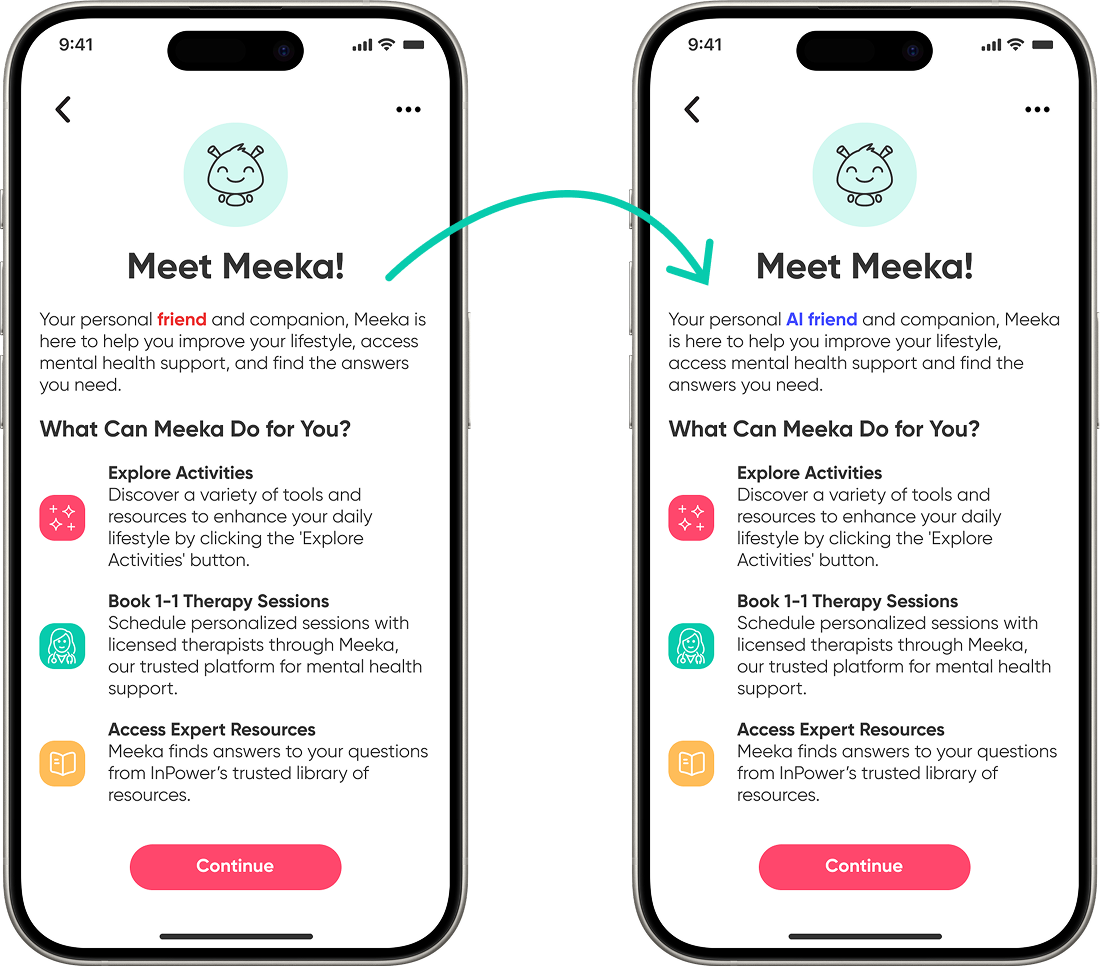
Meeka is an AI Friend
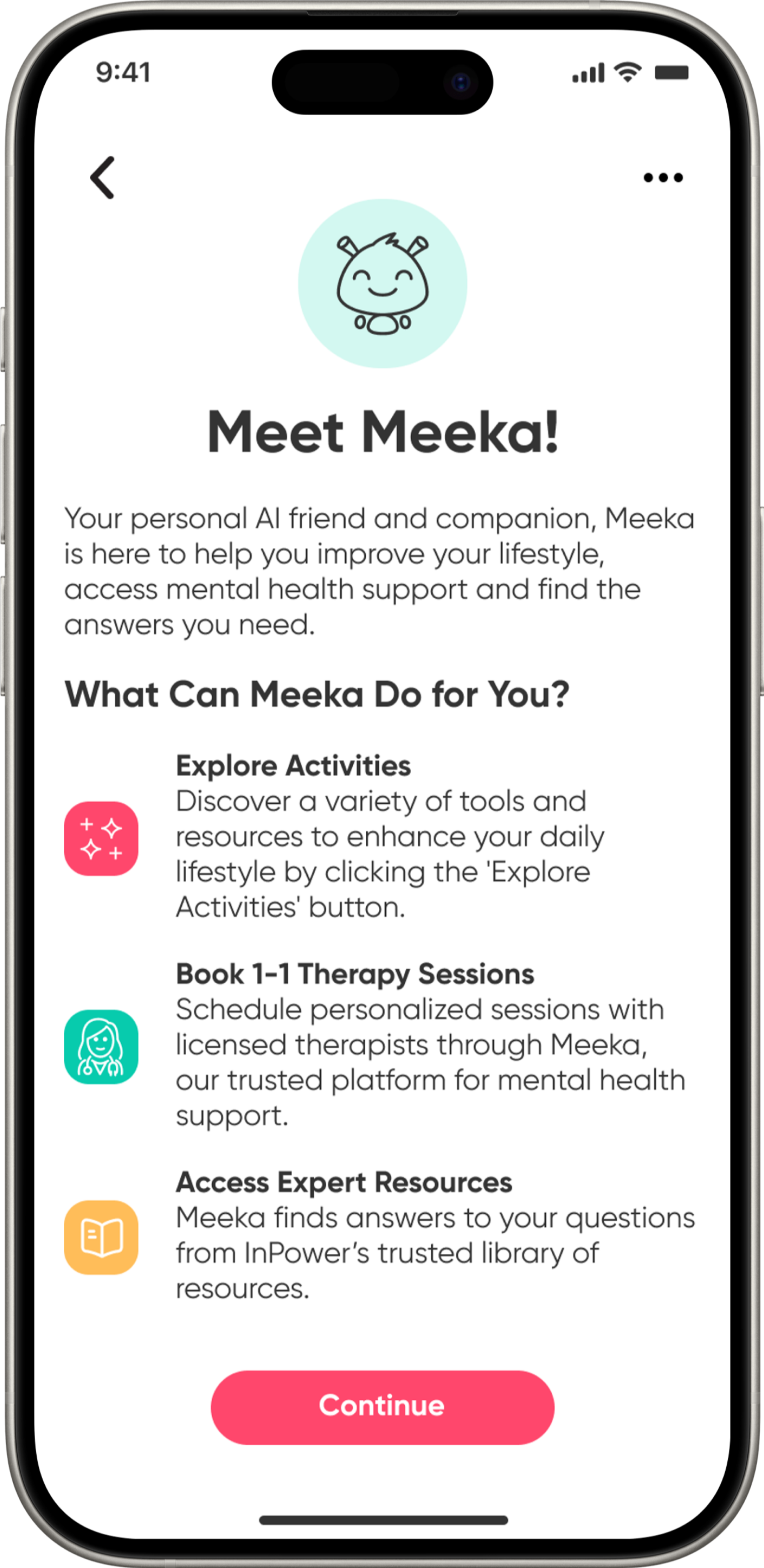
Adding the text “AI friend” on the welcome screen helps clarify that Meeka is a chatbot, not a licensed therapist. While users can book therapy sessions with real, licensed therapists through InPower, with assistance from Meeka, our usability testing revealed the importance of explicitly distinguishing Meeka as an AI bot to set accurate expectations.
Link Source - InPower Library
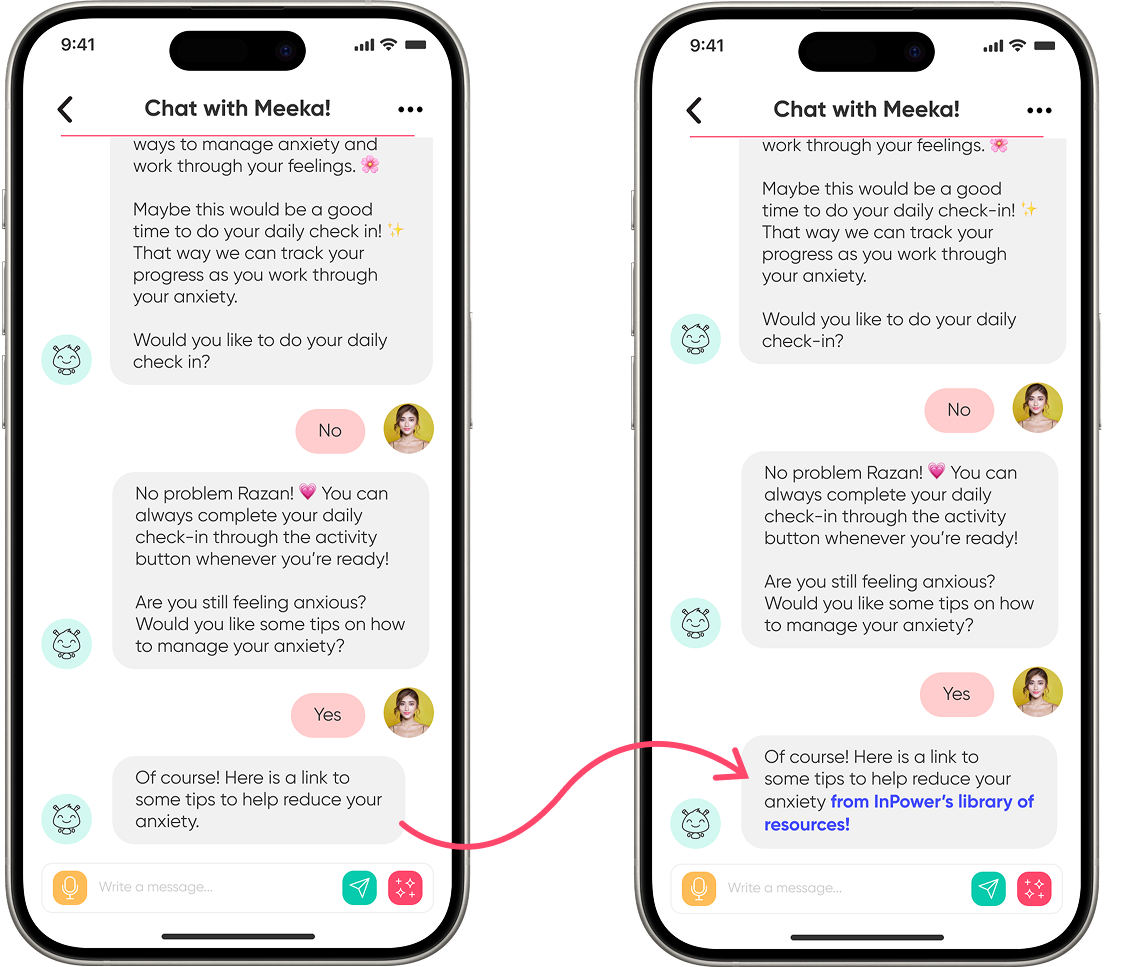
When Meeka shares an article with the user, it’s important to indicate that the link comes from InPower’s library of resources. This assures the user that they are not leaving the app but are being redirected to the article within the app itself.
Additionally, this reinforces Meeka as a trusted tool for accessing reliable, curated resources, offering users a dependable alternative to conducting their own potentially unreliable internet searches.
Task 2 - Results
100% of users were able to complete the task
4/5 users were able to identify the link being provided by Meeka was an article BUT do not know where the article comes from
1 user error: Pressed ‘No’ instead of ‘Yes’
Final Prototype
Takeaways & Next Steps
Reflection
Next Steps…
Working on Meeka has been an immensely valuable learning experience, especially since it marked my first time working closely with a team and directly with a client. This experience added an exciting yet challenging dimension to the project, as I had to find a balance between user needs, client goals, and team collaboration, all while ensuring the design aligned with Meeka’s overarching vision.
Looking back, if I were to approach this project again, I would feel much more confident. I realized that the project’s potential was often held back due to my hesitation in both giving and receiving feedback, largely driven by self-doubt. However, as the project progressed, I gradually learned to trust my teammates, and it was their support and collaboration that ultimately allowed me to approach the project with complete confidence and deliver my best work.
Currently, InPower is focused on further developing their platform with the goal of launching it to the public soon. I’m excited to stay connected with the team and hope to collaborate on future features if the opportunity arises. As for Meeka, there are several features that could enhance its development. If I were to continue working on the chatbot I would begin by working on personalizing the bot, allowing for customizable personas, names, and other unique attributes. Additionally, I would look to incorporate more interactive elements, such as guided breathing exercises, to further engage users. With AI’s boundless potential, I believe Meeka could significantly enrich the user experience within the InPower platform and excited to see what’s next for them.