Dreamscape
Project Overview
Background
Sleep is a fundamental human need vital for survival and overall well-being. Without adequate sleep, daily functioning can be significantly impacted, and chronic sleep deprivation may lead to serious health issues, often without individuals realizing the extent of the harm. By providing the right tools, people can take meaningful steps toward improving their sleep quality and, in turn, enhancing their overall health and lifestyle.
Problem
Many people struggle with finding ways to get better sleep. There needs to be a solution to improve a user’s quality of sleep based on their individual needs.
Goal
To solve the issue of oversaturation in the sleep-related website & app market by offering an all-in-one solution for the targeted users’ needs.
Project Type
Timeline
Role
Tools
80+ hours
UX/UI Design
Figma, Canva, Procreate, Optimal Sort
UX/UI Designer; Researcher
Discover
Market Research
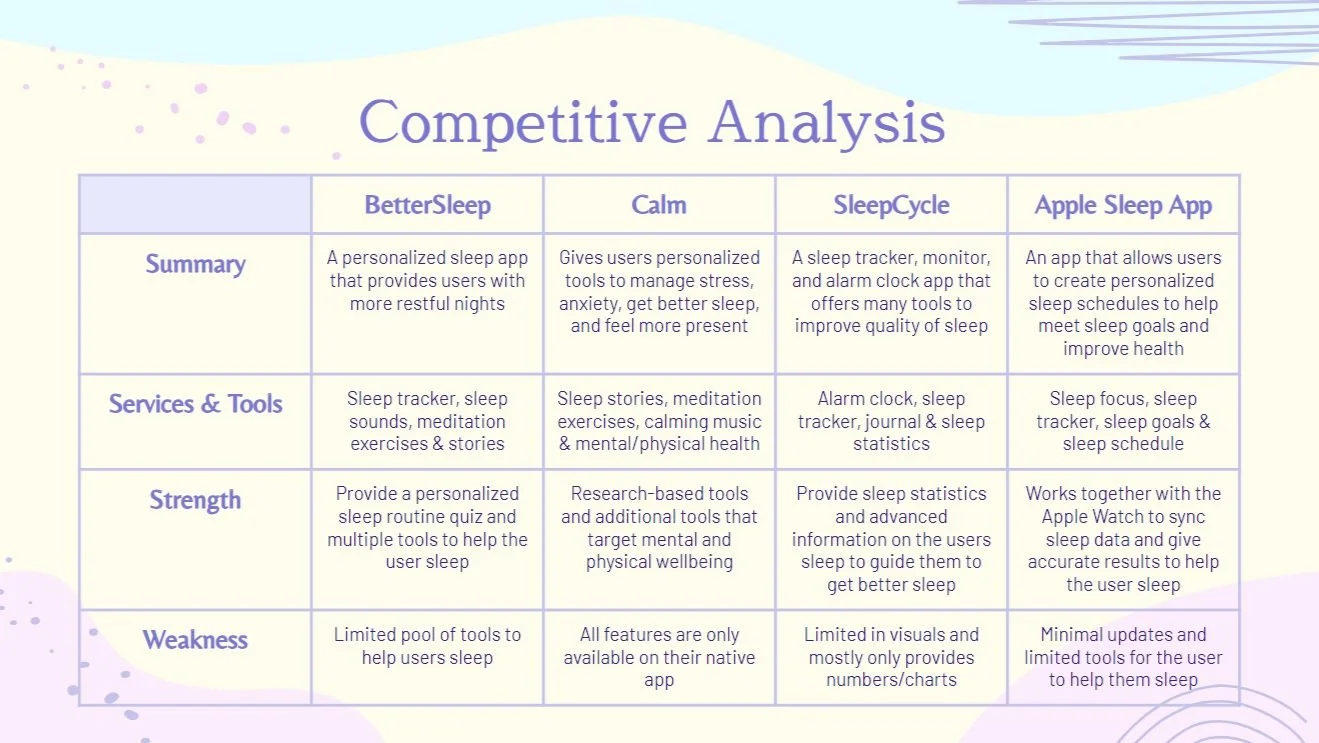
For this competitive analysis, I explored direct competitors in the sleep app market. Through this research, I discovered a wide variety of approaches and techniques that other apps use to assist users in improving their sleep. This analysis provided valuable insights into industry trends, user needs, and potential opportunities for innovation within the space.
Competitive Feature Analysis
Insights
Users value a sleep solution that feels customized to their specific needs, such as their sleep patterns, preferences, or goals.
Combining sleep tools with additional wellness features like mindfulness or stress management can make an app more appealing and versatile.
There is also a direct relationship between mental and physical health that greatly affects sleep.
Offer innovative relaxation tools that stand out from competitors.
Include features to help users build and sustain positive sleep habits.
User Research
User Interviews
The goal of the interviews is to understand the main internal and external factors that affect a users quality of sleep.
Identify the controllable factors that positively or negatively impact sleep quality.
Assess users' motivation levels to enhance their sleep quality.
Explore whether users currently utilize techniques to improve their sleep.
Determine the optimal times and frequency for users to incorporate effective sleep-improvement techniques into their daily routines.
Research Objectives
Define
Affinity Map
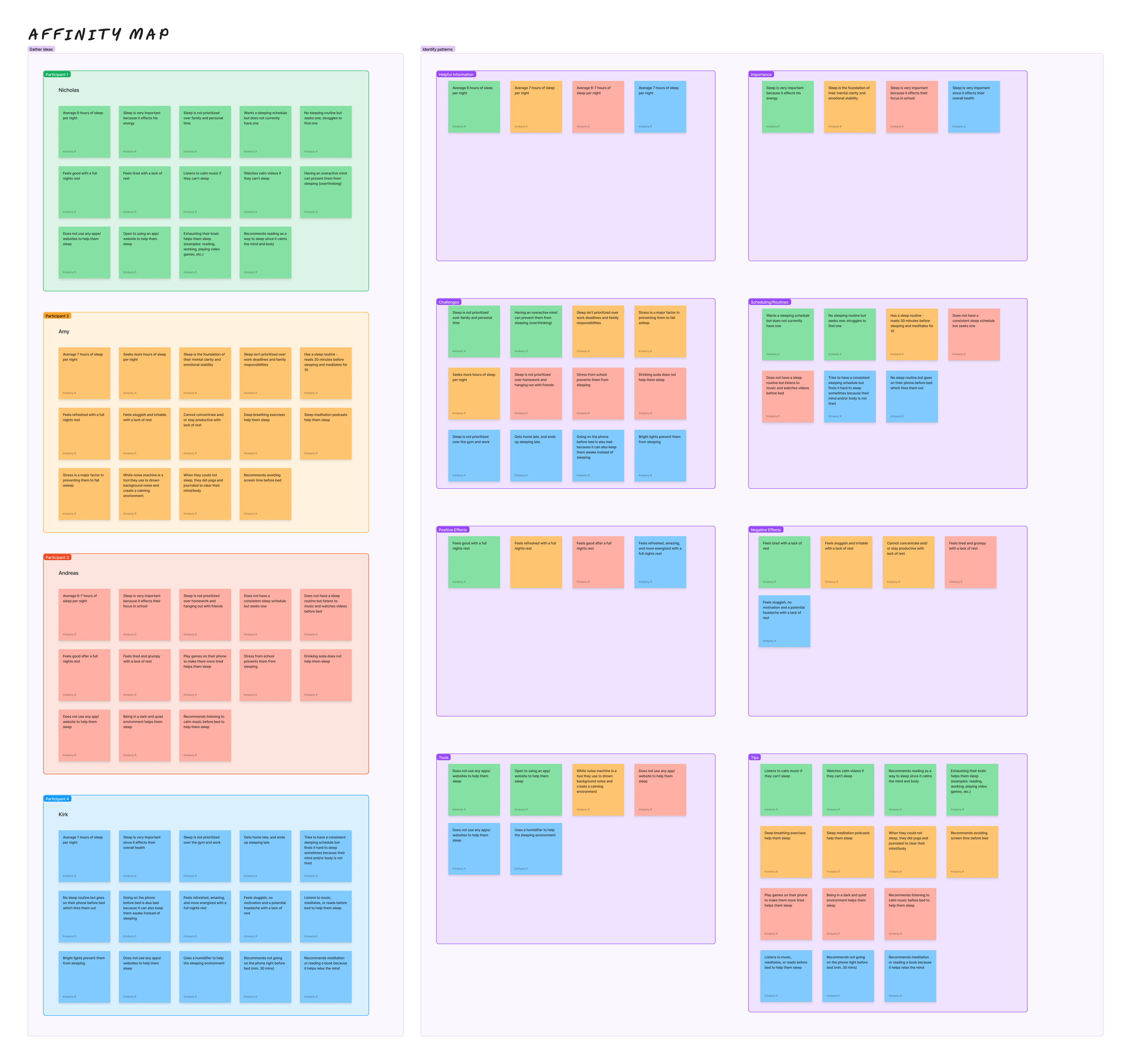
After completing the user interviews, I organized the data into an affinity map, grouping similar ideas, feedback, and patterns into meaningful categories to identify key themes and trends. As a visual learner, this method allowed me to effectively uncover significant pain points, motivations, and behaviors related to sleep habits. Identifying these aspects help ground my understanding of my users and their needs.
User Personas
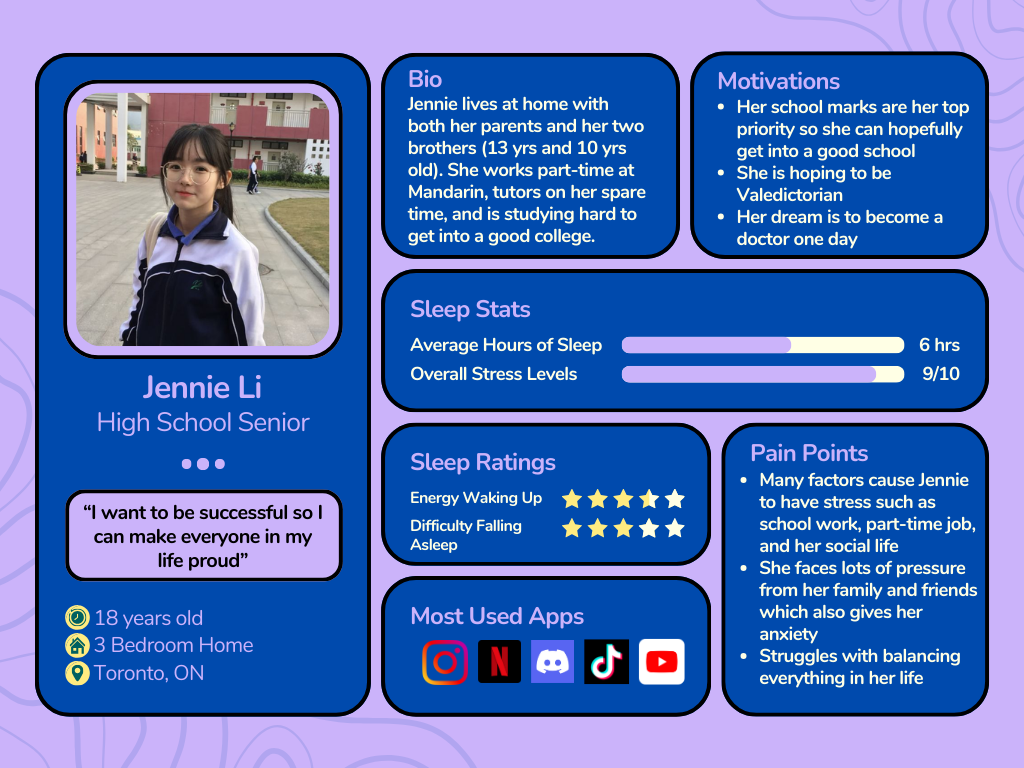
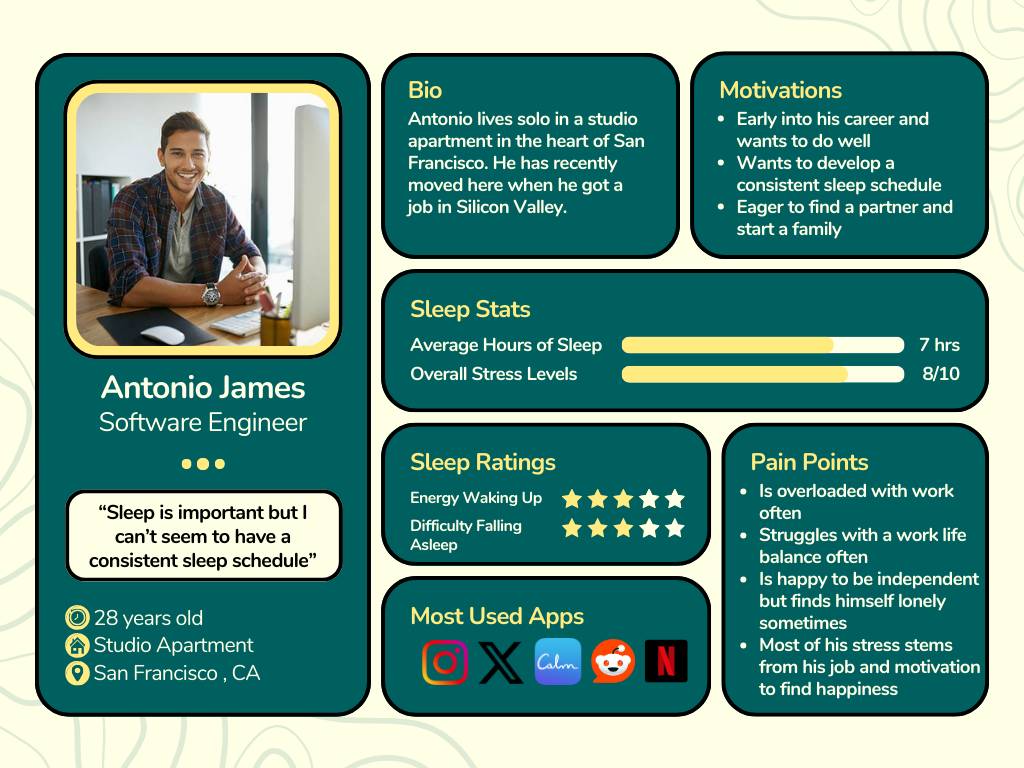
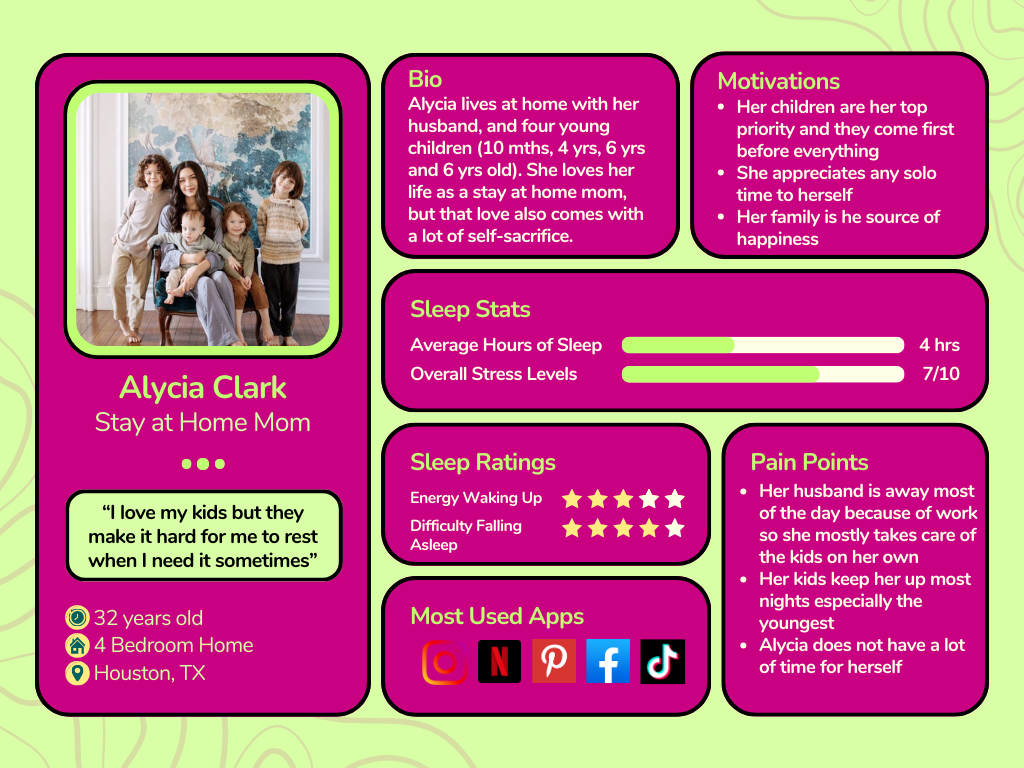
Using the data collected from my user interviews and further refined through the affinity map, I developed three realistic user personas that represent my key audience. These personas help me view users as real individuals with unique lifestyles, motivations, and challenges. By understanding their daily routines, goals, and pain points, I can better empathize with their needs and design thoughtful, user-centered solutions. The personas serve as a guiding framework throughout the design process, ensuring that every decision aligns with the users’ experiences and expectations.
Defining our Problem
POVs & HMWs
Using my personas and user insights, I can now develop POVs (Point of Views) and HMWs (How Might We statements). These will allow me to transform my research into design-driven questions that address user needs and help me create effective solutions.
I’d like to explore ways to help…
-
calm their mind before sleeping because their mind is preoccupied with too many thoughts
-
in developing a sleep schedule because they sleep inconsistently from their busy schedules
-
find time for themselves throughout the day to calm their mind and body
-
stay calm before an exam because they lose sleep due to overstressing and studying
How Might We…
-
Provide the correct tools to calm their mind?
Create a better sleeping environment for the person?
-
Develop the right schedule that fits into their day-to-day life?
Provide a scheduling tool that is easy and convenient?
-
Give time to the parent but not take time away from their child?
Create the right environment for them to achieve their goals?
-
stay calm before an exam because they lose sleep due to overstressing and studying
Key Findings
Provide Multiple Solutions
The user requires multiple tools to help them get the best sleep since each user has unique individual needs.Target Both Mental and Physical Aspects of the Human Body
Sleep is dependent on the body mind and body so any intervention should target both.Being Mindful of the Users Environment
The environment is equally as important as any factor so making sure users are within an ideal environment when sleeping is vital to achieving better sleep
Actionable Insights
Ideate
Project Goals
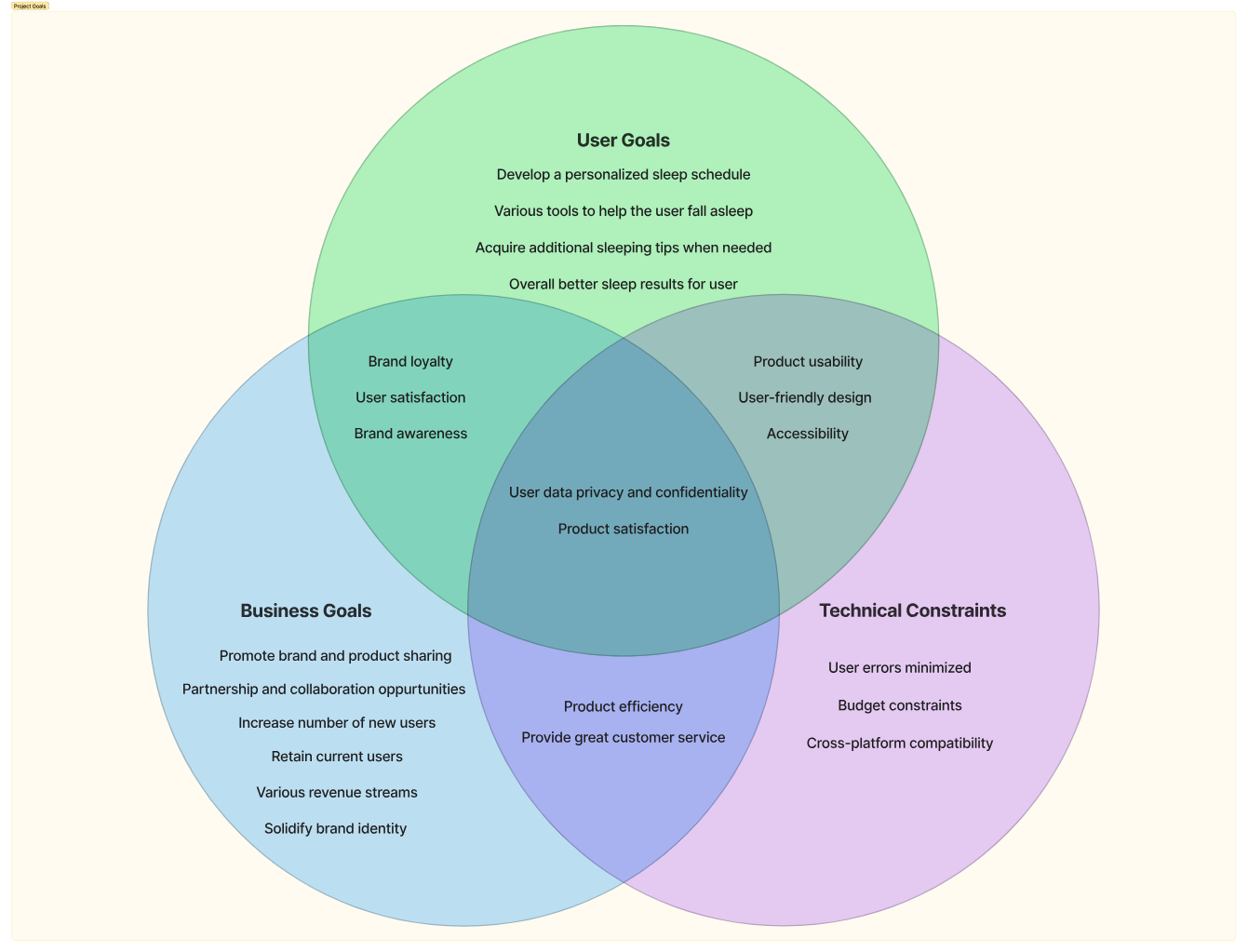
To establish clear project goals, I focused on 3 main elements: User Goals, Project Goals, and Technical Constraints. By analyzing user needs and motivations, I aimed to prioritize features that genuinely enhance sleep quality and fit seamlessly into daily routines. At the same time, I considered business objectives, such as the brand and ways to stand out of the sleep app market. Finally, I factored in technical constraints, ensuring the app remains feasible to develop while maintaining a seamless user experience. By focusing on these 3 key factors, I was able to connect overlapping elements to ensure a cohesive foundation for my future design.
Feature Set
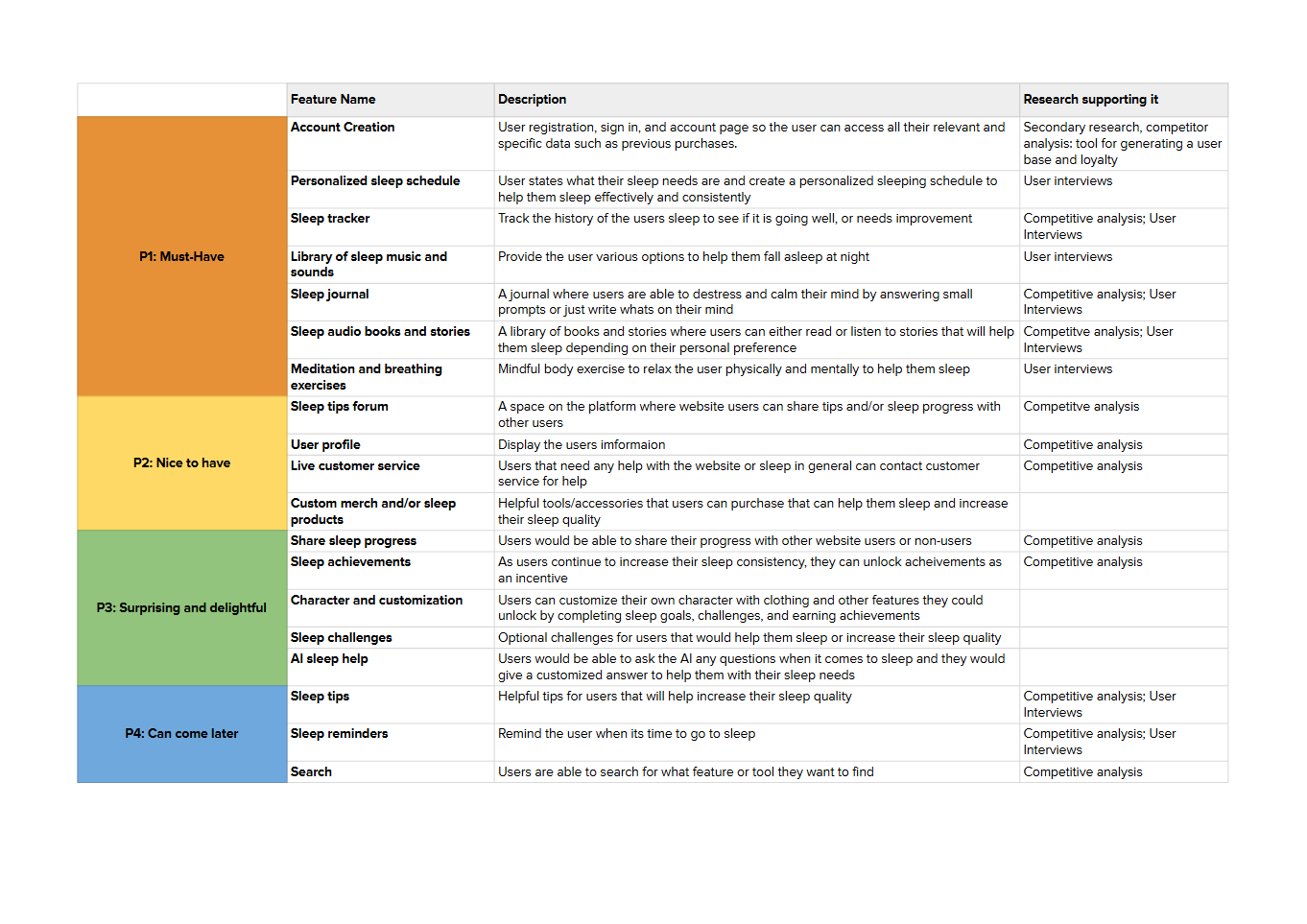
It is time for me to use all the data I collected and organized into solutions for my users. Supported by my competitor analysis and user interviews, each feature was hand-picked with the users benefit in mind.
Card Sorting
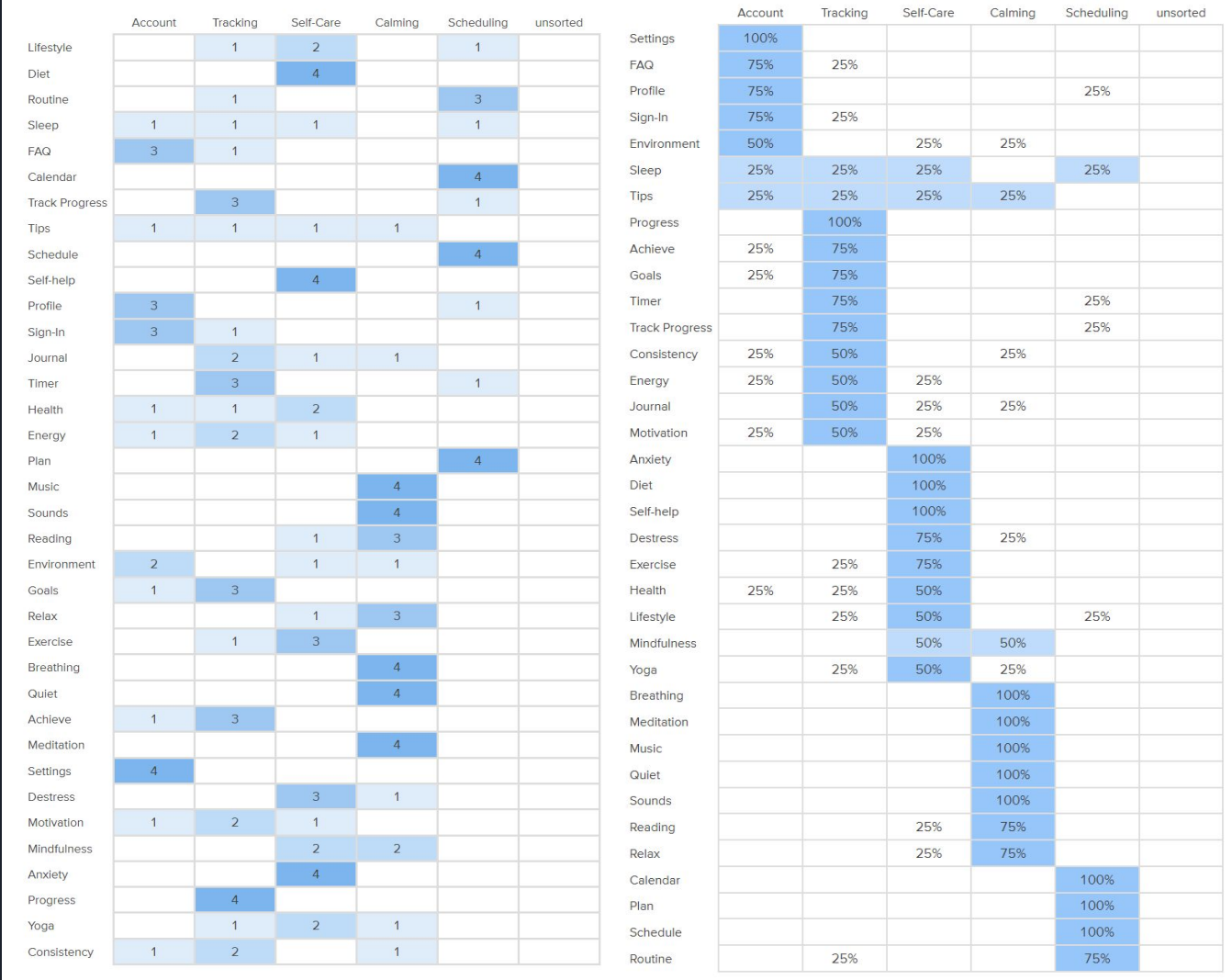
To help me understand my users organize information and categorize content about topics related to sleep, I conducted a card sorting study.
Findings
Some participants found that some words were difficult to categorize
Participants stated that there were similarities between the two categories: tracking and scheduling so I believe it is important for me to distinguish the two
There was no distinct category that sleep and tips were categorized which is a good thing because it means that they are both universal and can be attributed to all categories
Task Flows & User Flows
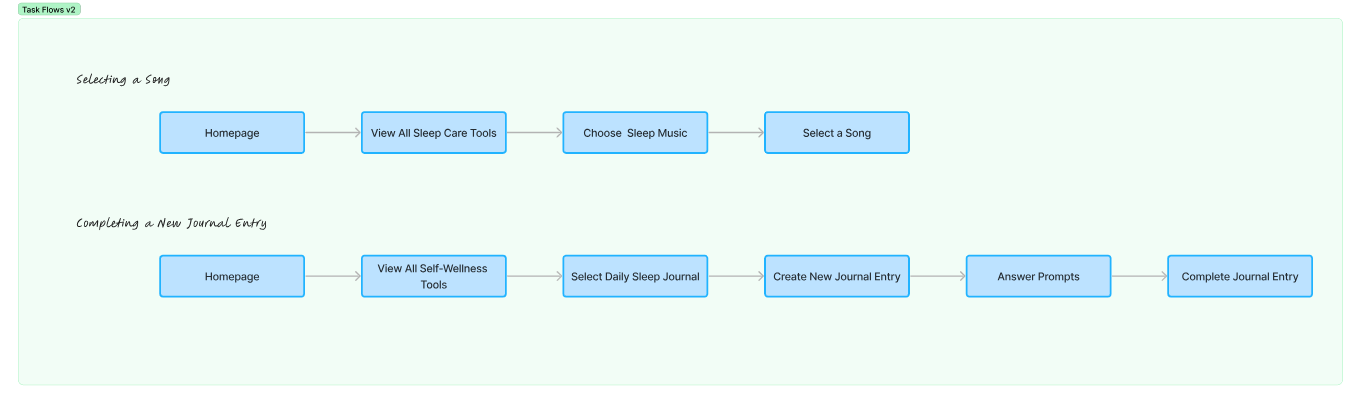
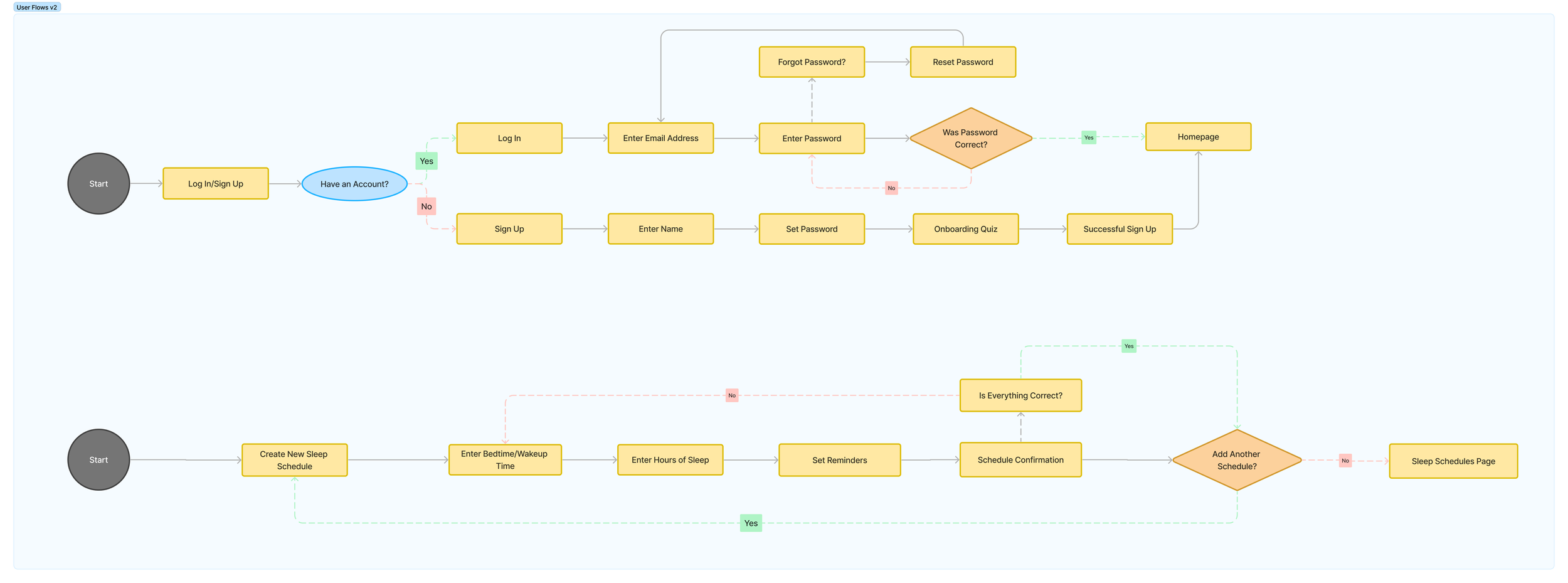
I created two task flows to explore specific user actions: selecting a song for relaxation and creating a journal entry. These flows helped me ensure that each step of the process is intuitive and supports the user's goals seamlessly. Additionally, my user flow focuses on two essential experiences: the log-in/sign-up process and creating a new sleep schedule. By mapping these flows, I was able to design clear and efficient pathways that prioritize user needs and enhance the overall experience.
Site Map
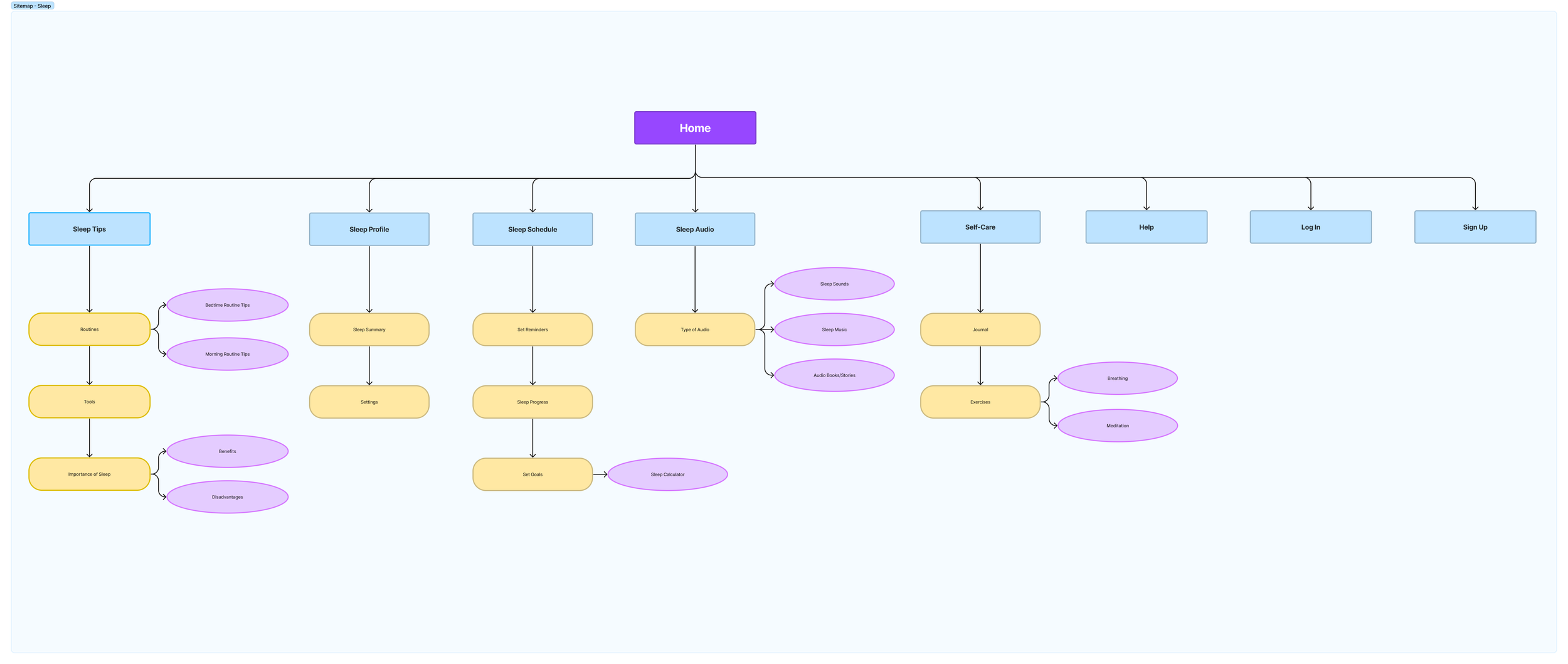
Next is the site map which outlines the app’s structure, showcasing the hierarchy and organization of its core features and navigation. This visual guide ensures a logical flow between screens, making it easy for users to access key functionalities such as their sleep profile, schedule, sleep audio, and self-care options.
Wireframing
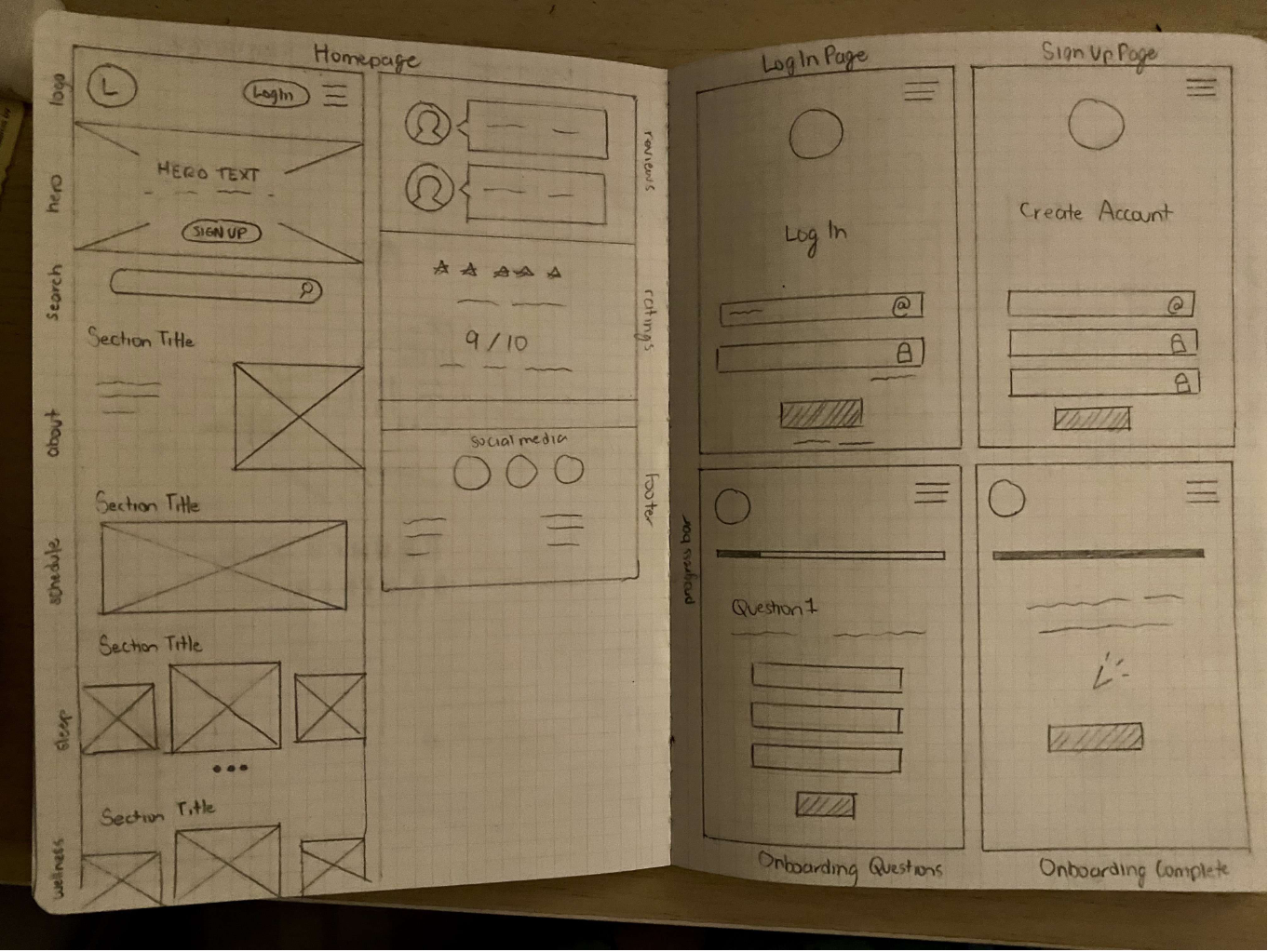
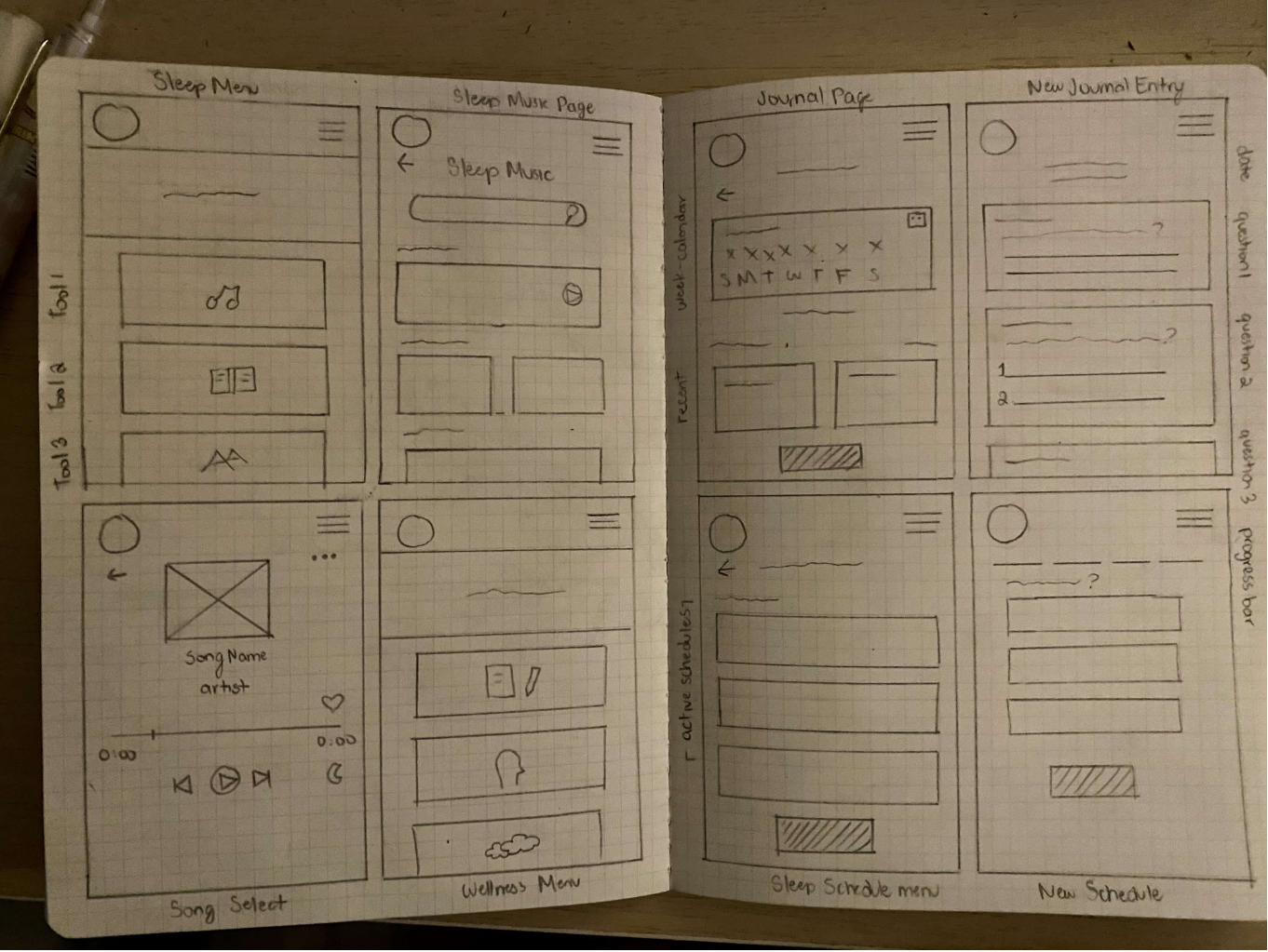
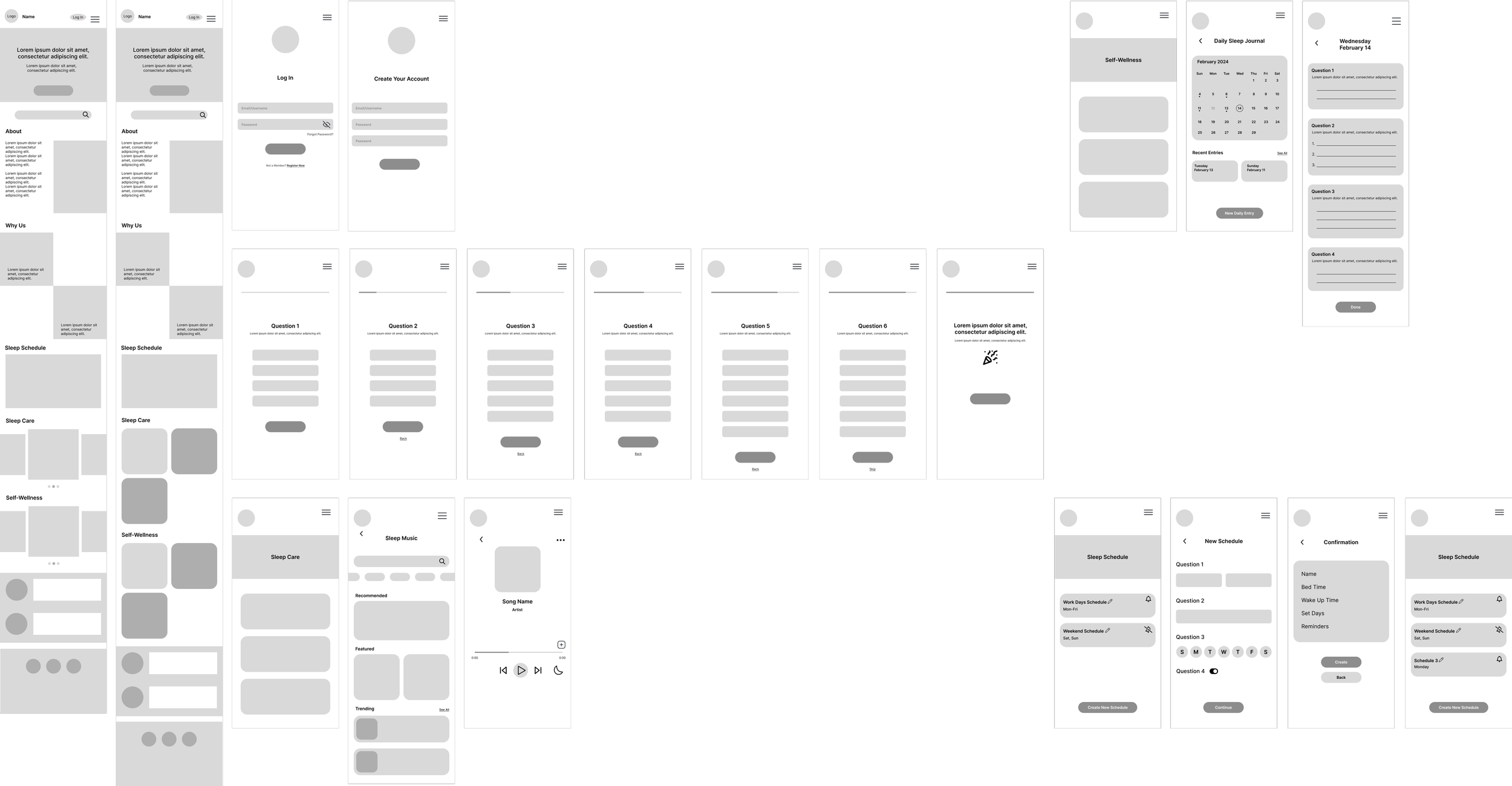
To bring my ideas to life, I began by sketching low-fidelity wireframes that focused on the app’s core layout and functionality. These initial wireframes allowed me to visualize the placement of key elements, such as the hero section, log-in UI, sleep menu and journal pages, without worrying about intricate design details.
Low-Fidelity Wireframes
Mid-Fidelity Wireframes
Building on the foundation of my low-fidelity wireframes, I created mid-fidelity wireframes to refine the structure and functionality of Dreamscape. At this stage, I focused on adding more detail to key elements, such as interactive components and page layouts, while maintaining a grayscale design. The mid-fi wireframes allowed me to test the flow and usability of my screens ensuring they aligned with user goals and expectations before progressing to high-fidelity designs.
Prototype
Mood Board
Why Dreamscape?
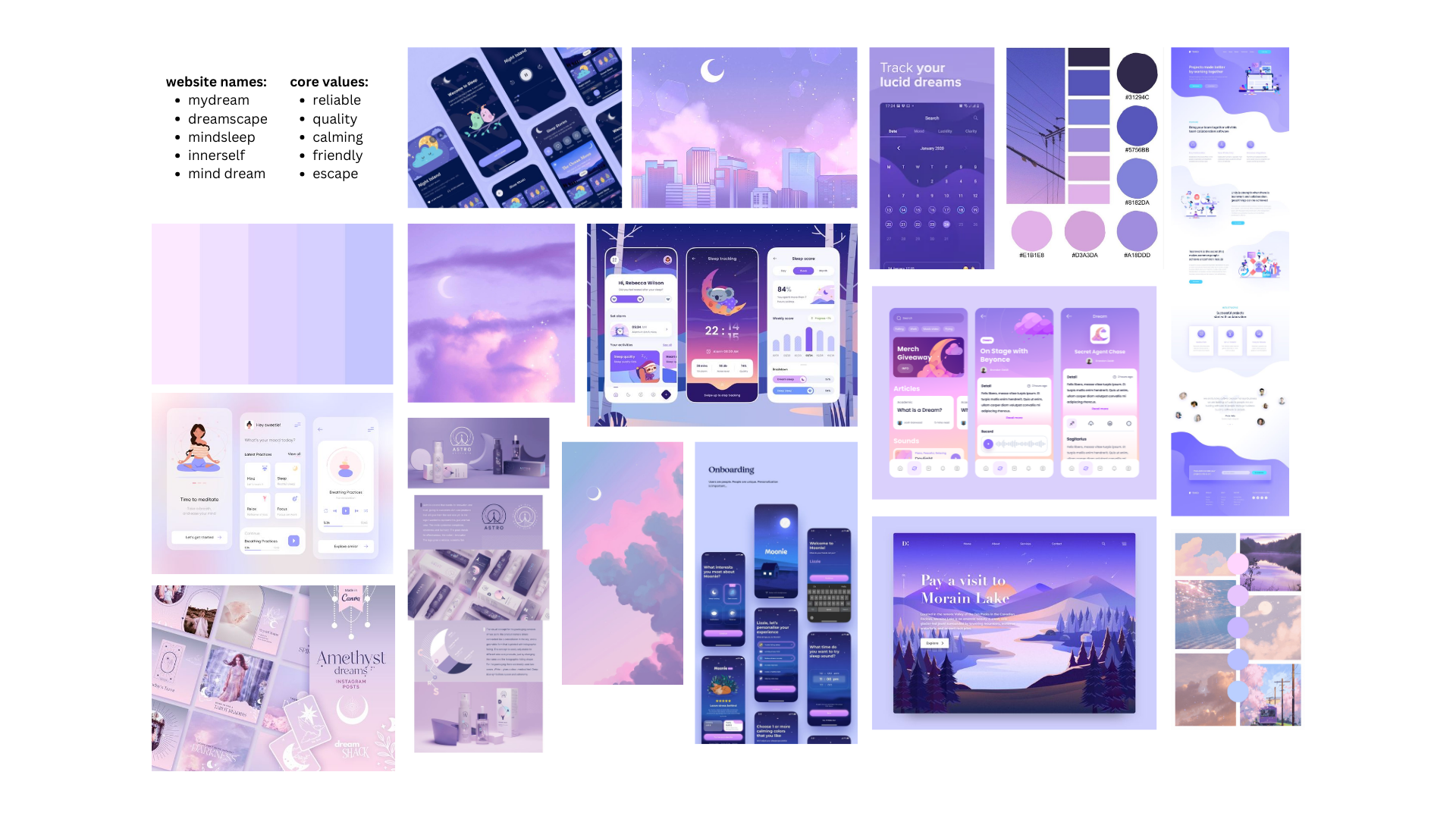
The inspiration behind Dreamscape stems from the core values I wanted to embody: “calming,” “friendly,” and “reliable.” After exploring various concepts, I chose the name Dreamscape, symbolizing an escape into dreams. Since dreams are often associated with positive and restful sleep, the name perfectly aligns with the mission of the website.
For my moodboard, I drew from the name, meaning, and values of Dreamscape to establish an overarching theme. The result is a dreamy and serene aesthetic that captures the essence of the brand and reflects my vision for the website’s design.
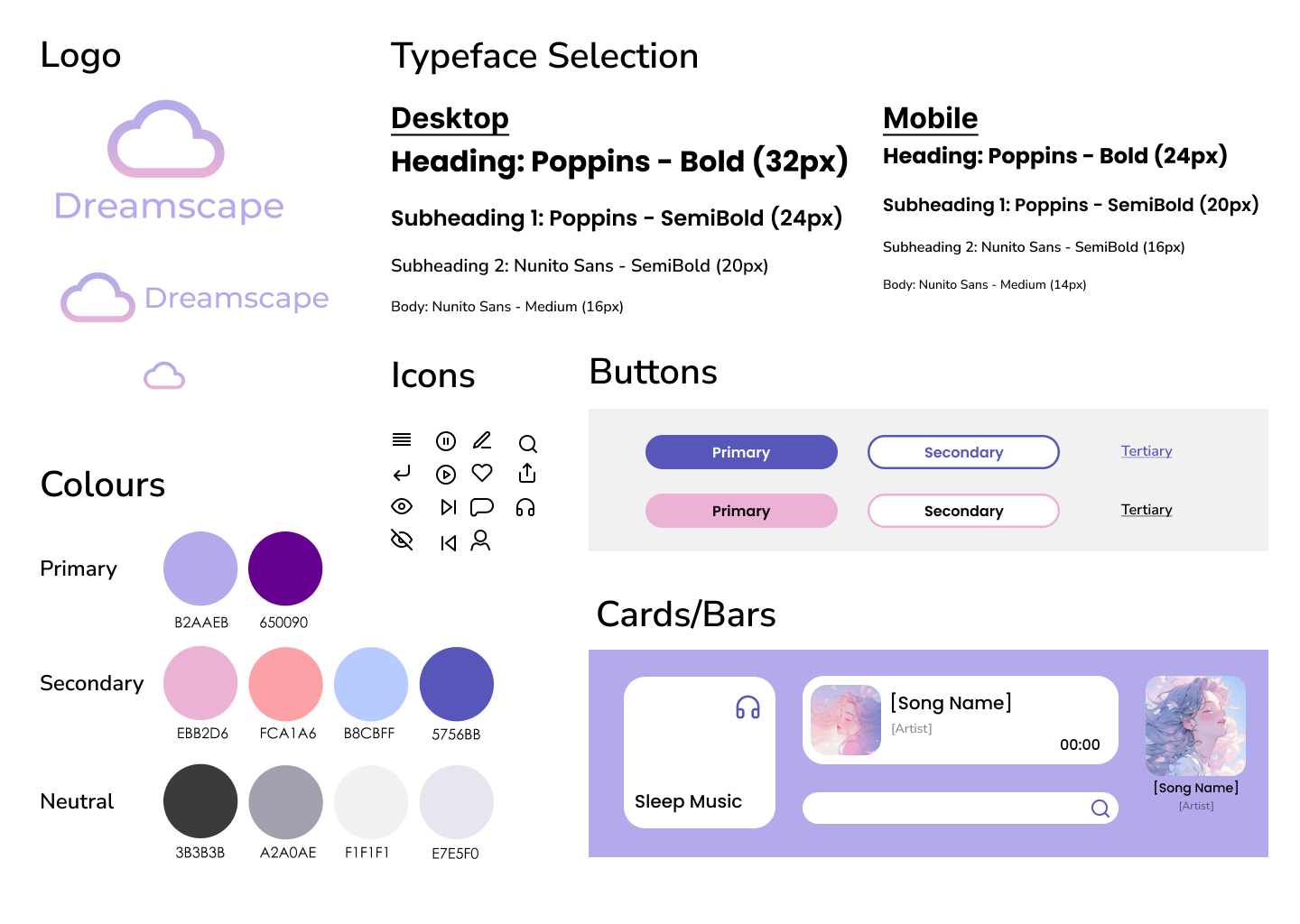
UI Component Library
For Dreamscape, I created a UI component library that reflects the calming and serene atmosphere the website aims to evoke. Soft pastel colors, rounded edges, and minimalistic icons/typography help maintain a sense of tranquility and warmth, ensuring that the user interface is not only functional but also aligned with the peaceful and restful experience Dreamscape seeks to provide.
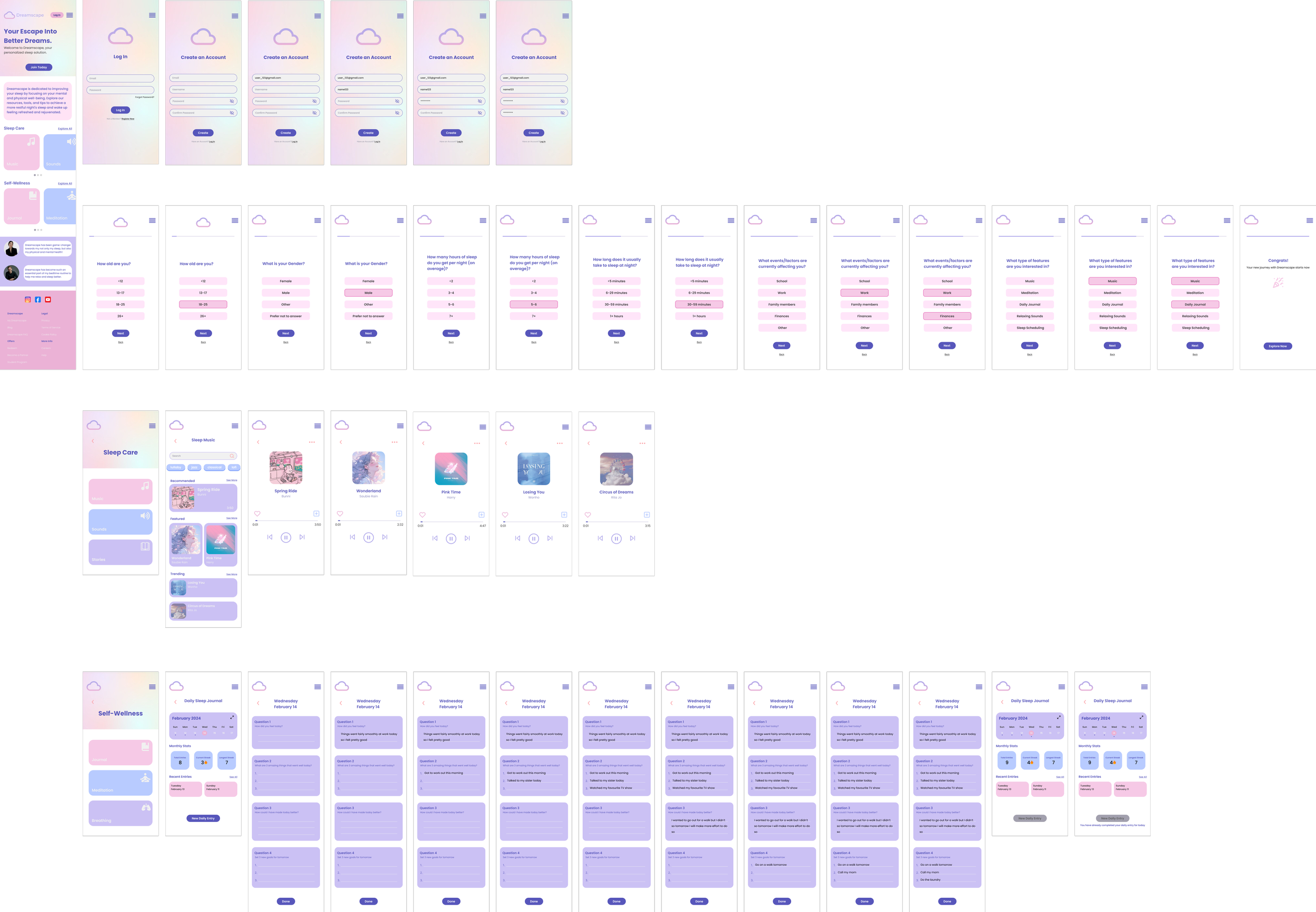
High-Fidelity Wireframes
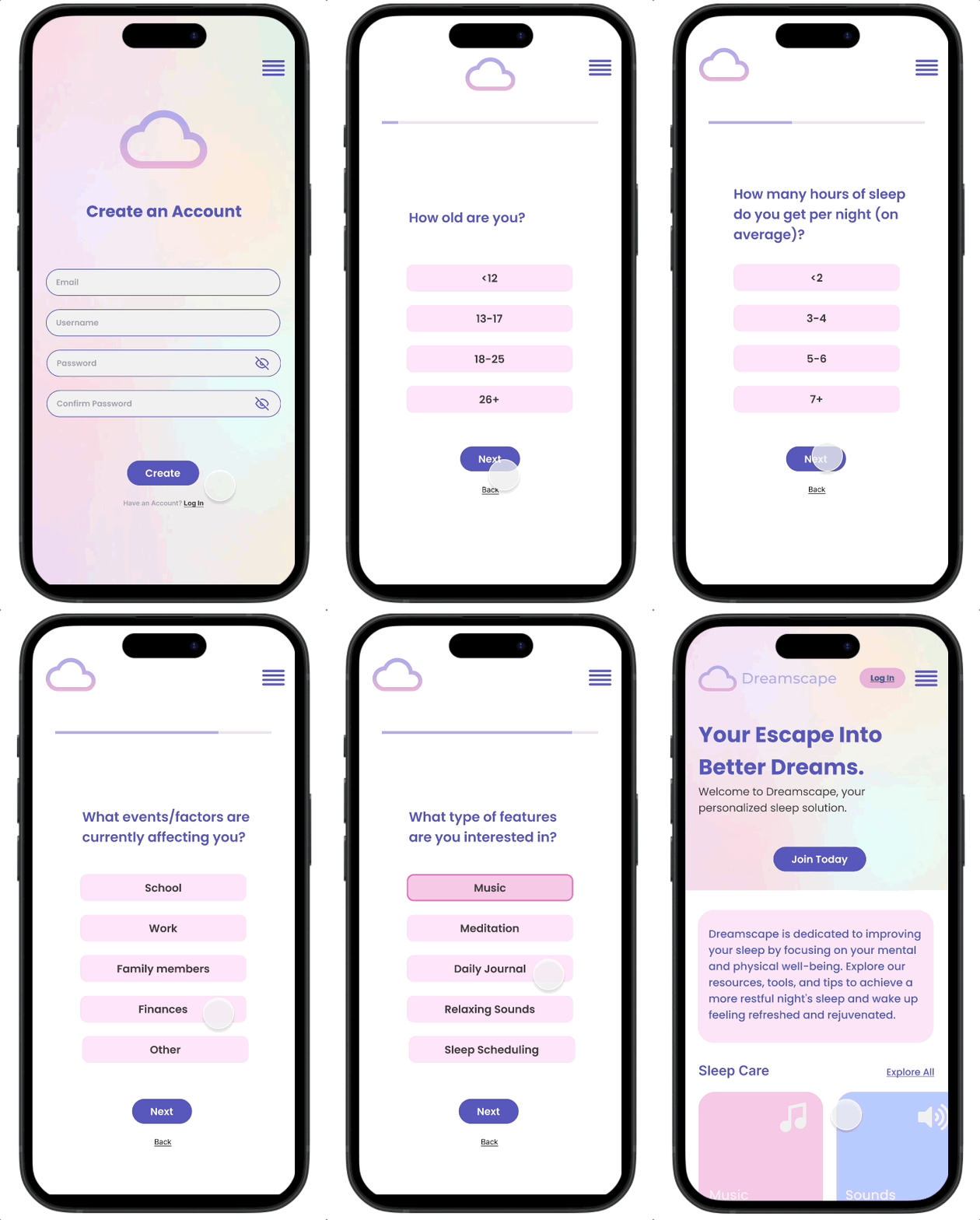
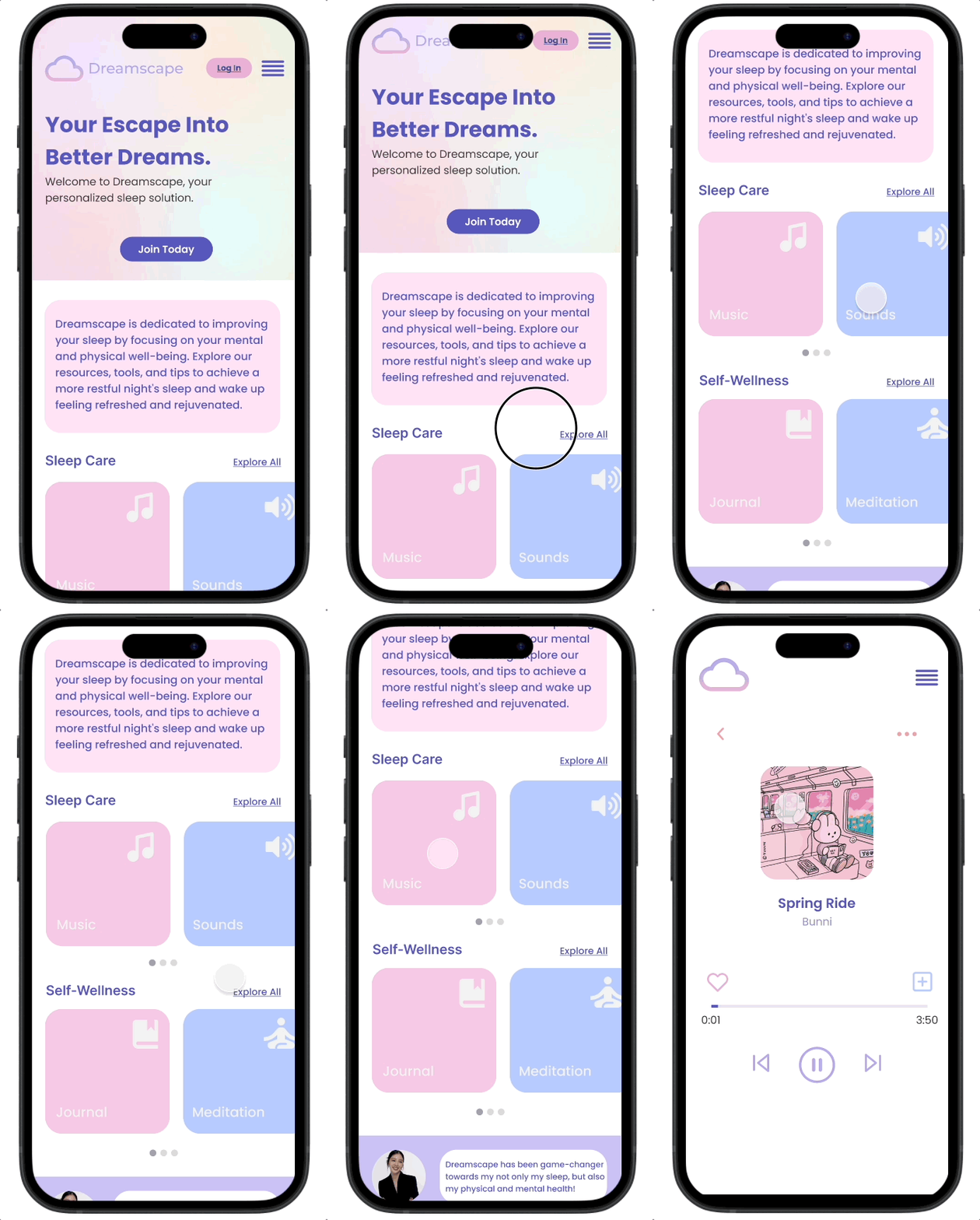
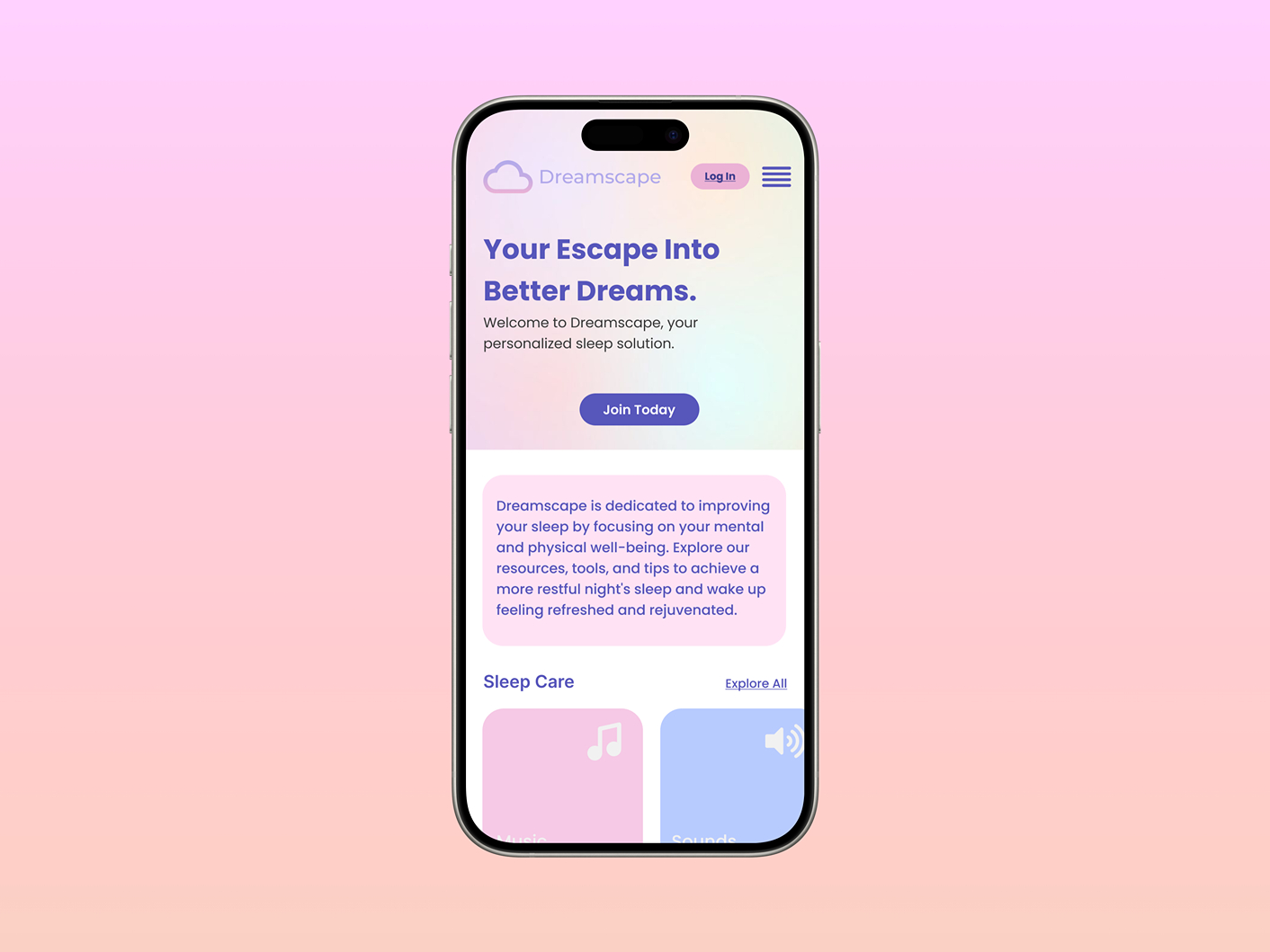
For the high-fidelity wireframes, I focused on bringing the design to life with detailed visual elements, incorporating the UI components from the component library. The high-fidelity wireframes allow for a clear representation of user interactions, from navigating the website to engaging with key features like signing up for a new account, finding a sleep song and journal entries, providing a realistic preview of the user experience before development begins.
Test
Usability Testing
Objective
To evaluate the usability of Dreamscape and identify any necessary improvements to enhance the overall user experience.
Interview Style & Methodology
Interviews were conducted 1:1 via FaceTime, in-person, or Discord.
Number of Participants: 5
Task Flows:
Task Flow 1: Sign up for a new account
Task Flow 2: Choose a song to listen to
Task Flow 3: Create a daily journal entry
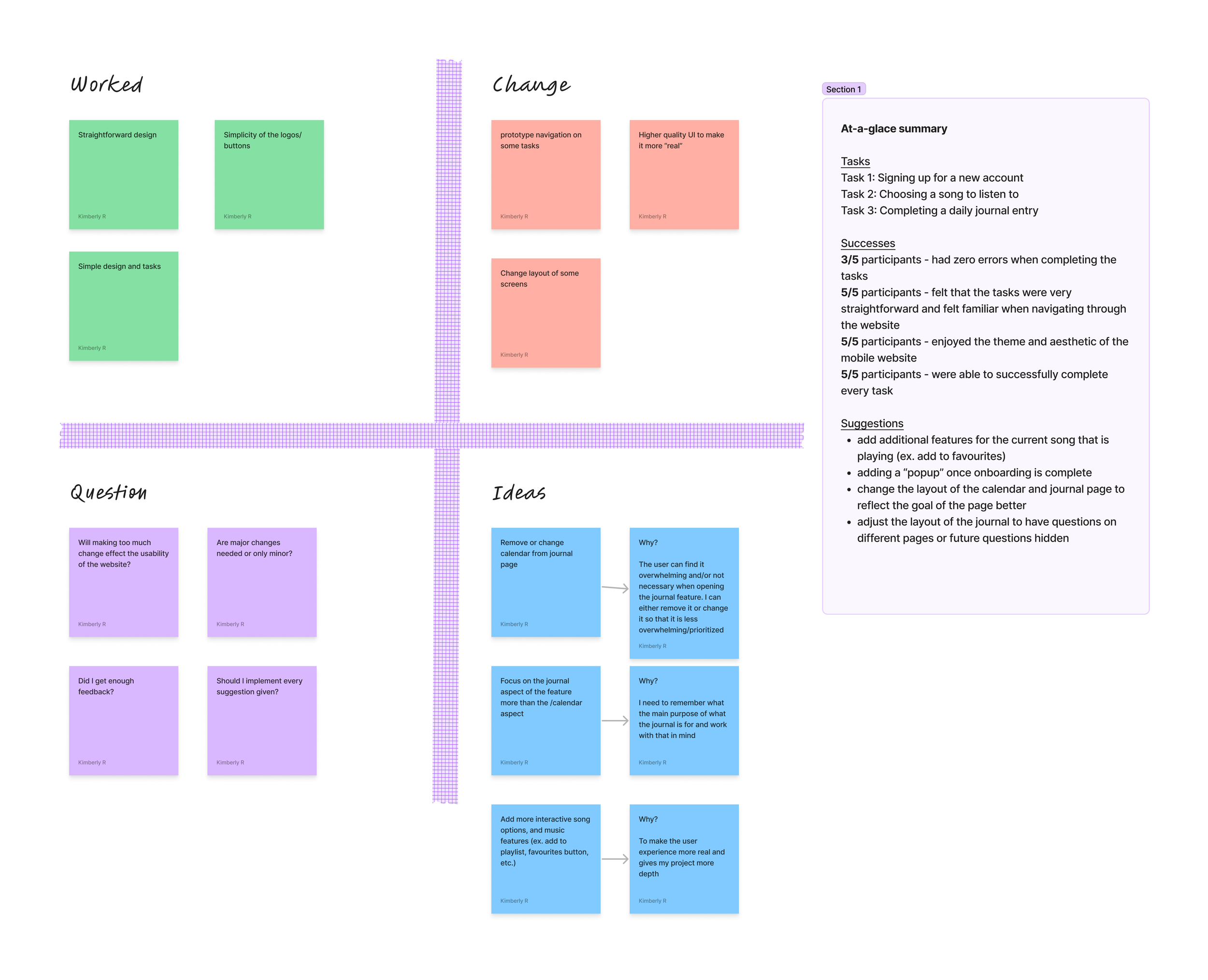
Interview Insights & Feedback
Priority Revisions
After carefully considering the feedback I received from usability testing, I was able to uncover pain points and areas for improvement, ensuring that the final design would be intuitive, user-friendly, and aligned with the needs of the target audience. The included changes that I incorporated include:
Listening to a Song: I introduced subtle features, such as a “like” button, to enhance the listening experience when users are engaging with sleep-inducing music. These small additions enhance the users controls with their music within the feature.
Journal Entry Screens: I refined the layout of the journal entry screens to ensure a smoother, more intuitive experience. This included reorganizing elements for better clarity and flow, and adjusting typography and spacing for improved readability.
UI Interaction: I made sure that all interactive elements, such as buttons and icons, were clearly clickable and worked effectively. This involved adjusting the design of smaller elements to ensure they were accessible and easy for users to engage with.
Final Prototype